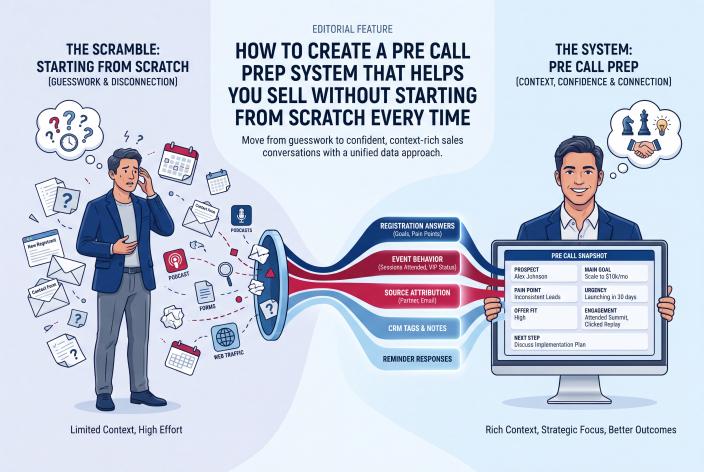
If you're a therapist, counselor or healing practitioner, and people book consultations after hearing you speak at a virtual summit or workshop, you don't have to prepare each call from a blank page. A pre-call prep system is a short routine you repeat every time. It has four parts: a few non-clinical intake questions, one CRM view that pulls together what you already know about the person, the boundaries you say out loud at the start, and a referral list that's ready when you aren't the right fit.
You set those four pieces up once, then reuse them for every call.
People who meet you through an event show up with context. They've heard how you think, they may have registered through a colleague's link, and they often feel they already know you. That's a lovely place to start a consultation. It also means they may share a lot very quickly or treat the call as a first session. With a prep routine you can respect that connection and still keep the call a consultation, so you don't have to improvise your way through it.
Key Takeaways
- Ask four or five plain, non-clinical questions at registration and booking, and keep diagnoses, history and other sensitive details out of your marketing tools.
- Gather registration answers, the speaker who referred them, VIP status and booking answers on one contact record so you can review it in about ten minutes.
- Open every consultation with the same short boundary statement: how long it lasts, that it isn't therapy, and that you'll help them find someone else if you aren't the right fit.
- Build your referral list before the event goes live, starting with the speakers you've already watched teach.
- Check your licensing board's advertising rules before you publish any pre-call page or booking form copy.
Why Event Consultations Need Their Own Routine
A referral from a doctor or a directory listing gives you a name and maybe a reason. An event gives you much more, but only if you capture it. You know which talk they watched, whose link they used to register, whether they bought the VIP pass, and what they wrote when they signed up.
And most practitioners lose all of that before the call. It sits in an event tool, a calendar and an inbox, and none of them talk to each other.
Jennie and I saw this up close after we built EventRaptor. Running the summit itself got easy for our customers. What happened afterward was the hard part. Many hosts added hundreds of people to their list and turned few or none into clients, because nothing connected registration to a real conversation. For a practitioner, that missing link usually shows up as a consultation where you spend the first ten minutes asking questions the person already answered.
What Should Your Intake Questions Ask?
Keep them short, practical and non-clinical. You're trying to find out whether a consultation makes sense and how to prepare for it. You aren't trying to assess anyone before you've met them.
| Question | When to ask | What it tells you |
|---|---|---|
| Which talk or session brought you here? | Registration or booking | What they expect from you, in their own words |
| In a sentence or two, what are you hoping to explore? | Booking | Whether it fits your specialty |
| Are you interested in individual work, a group program, or just exploring options? | Booking | Which offer to talk about, if any |
| Where do you live? | Booking | Whether your license lets you work with them there |
| My fees are listed above. Does that work for you right now? | Booking | Readiness, without an awkward money moment on the call |
The person's answers to the first question are worth more than you'd expect. Someone who writes "your talk on boundaries with adult siblings" is telling you exactly where to begin.
What To Leave Out
Don't ask for diagnoses, medications, trauma history or anything you'd treat as clinical information. Your CRM is a marketing and scheduling tool. Detailed intake belongs in your practice records after someone becomes a client, under whatever privacy rules apply to you. Check with your board or professional association if you're not sure where that line sits for your license.
It also helps to add a gentle line to the booking form: "Please don't share anything private here. We'll talk properly on the call." Put your crisis resources nearby as well, so anyone who needs urgent support knows where to go.
We've written a longer guide on designing registration questions that reveal your best prospects if you want more examples to adapt.
How To Put Everything on One Contact Record
This part should be automated, because doing it by hand never survives a busy week. Here's how it works when the event runs on EventRaptor and follow-up runs in GHL/CRMRaptor.
- Add your one or two registration questions to the summit's registration page in EventRaptor.
- Give each speaker a promoter link. When someone registers through a colleague's link, the attribution is recorded, so you'll know who introduced them.
- Registrants sync to GHL/CRMRaptor with tags (the event, VIP status, the promoting speaker) and their answers stored in custom fields.
- Your consultation calendar's booking form adds the booking answers to the same contact, so registration and booking details end up in one record.
- Pin a short note template to the contact: "Talk that brought them / What they want to explore / Offer interest / Location / Fee OK?" You fill it in from the fields in a couple of minutes.
- Booking confirmations and reminders go out automatically, with a link to your pre-call page (more on that below).
If you'd rather not touch any of this, our done-for-you team builds the registration pages, promoter links, CRM sync and reminder emails as part of producing your summit. You teach, host and take the calls.
One honest note. EventRaptor doesn't track which sessions an attendee watched, so the "which talk brought you here" question does that job. People are usually happy to tell you, and their own words are more useful than a viewing log anyway.
The Ten-Minute Review Before Each Call
Run the same checklist every time. Once you're used to it, it takes about ten minutes.
- Read their answers to the registration and booking questions.
- Note which speaker's link they came through, and whether you'd trust that colleague as a referral if needed.
- Check VIP status. A VIP buyer has already paid for more of your thinking.
- Confirm their location against where you're licensed to practice.
- Glance at any email replies they've sent since registering.
- Decide which offer, if any, you'd mention: individual work, a group program, a workshop or a waitlist.
- Pick two names from your referral list that might suit them, just in case.
If you also sell coaching or consulting, our piece on what to review before a sales call so summit prospects feel understood goes deeper on reading these signals.
The Boundaries You State in the First Two Minutes
Event leads often arrive warm and open. That's good, but it can pull a consultation into something that feels like a session, and that isn't fair to either of you. So say the frame out loud, in your own words, at the start of every call. A version might sound like this:
"Thanks for booking. This is a short consultation, so it isn't a therapy session. I'll ask a few questions about what you're looking for, explain how I work and what it costs, and then we'll decide together whether I'm the right person. If I'm not, I'll suggest someone who might be."
If they start going deep into something painful, redirect kindly: "That sounds really important, and it's exactly the kind of thing we'd make proper space for if we work together. For today, can I ask..."
You'll find that saying the frame up front makes the call feel safer for the person, too, because they know what's going to happen.
What To Listen For During the Consultation
Your clinical judgment stays yours. The prep routine just makes sure you're listening for the business side as well, which is easy to forget when someone is opening up.
- Fit with your specialty and scope, measured against what they wrote on the form and what they're saying now.
- What they took from your talk. If they heard "quick fix" in a session about long-term work, gently reset that expectation.
- Logistics: schedule, format, fees and whether they can actually start.
- Interest in a group program or workshop, which might suit them better than individual sessions or come before them.
- Anything suggesting they need a different kind or level of support than you provide. Follow your training and professional protocols here.
For example, a couples therapist who spoke on a summit about communication after a new baby might find that a caller really wants individual support for something unrelated. That isn't a failed call. It's a referral, and it can still leave a good impression.
How To Refer Out Without Anyone Feeling Turned Away
Build the list before the event goes live, not after the first awkward call. Your summit speakers are a natural place to start. You've watched them teach, you know their focus, and many will happily return the favor.
Keep the list in a simple document with name, specialty, format, where they're licensed and how to contact them. On the call, the wording can be simple:
"From what you've shared, I think someone who focuses on [area] would serve you better than I would. I know two people I'd trust with this. Can I email you their details today?"
Then send the email within the hour, and add a tag in GHL/CRMRaptor such as "referred out" so your post-summit follow-up sequences don't keep inviting them to book with you. If they agreed to hear from you when they registered, they can stay on your newsletter. Our guide to segmenting warm leads so follow-up feels personal shows how to set up tags like this.
A Short Page To Send Before the Call
Jon Schumacher described a step on the Virtual Summit Strategies podcast that he called a "pre-frame" page. After someone booked and filled in his questionnaire, he sent them to a page with a short video about what to expect on the call and more of his content to watch. He also read every questionnaire and canceled calls that clearly weren't a fit before they happened, which saved time on both sides.
The idea works well for practitioners with a few changes. Jon used case studies and testimonials. Leave those out, because client stories and testimonials don't belong in a therapy practice's marketing. Here's what you can include instead:
- A two-minute video of you explaining how the consultation works
- Your summit talk replay, if you have permission to share it
- Your fees, cancellation policy and the formats you offer
- Your credentials, presented the way your board allows
Read your licensing board's advertising rules before you publish that page. It's a five-minute check that saves a lot of worry later.
Frequently Asked Questions
What Should a Therapist Ask Before a Free Consultation Call?
Ask a few practical, non-clinical questions: what brought them to you, what they hope to explore in a sentence or two, which format interests them, where they live, and whether your fees work right now. Those answers tell you whether the call makes sense and how to prepare. Save clinical questions for formal intake once they become a client.
Is It Okay To Keep Consultation Intake Answers in a Marketing CRM?
Keep only non-clinical information in a marketing CRM, such as which talk brought them, their format preference and their location. Don't collect diagnoses, medications or personal history there. If you're unsure what your privacy obligations allow, check with your licensing board or professional association before you build the form.
How Do I Refer Someone Out After a Consultation?
Tell them plainly and kindly that someone with a different focus would serve them better, and offer two names you trust. Email those details the same day so they aren't left waiting. A referral list built before your event, often starting with your summit speakers, makes this quick and comfortable.
Can I Use the Same Prep System for Group Programs and Workshops?
Yes. Add one booking question asking whether they're interested in individual work, a group program or a workshop, and tag the answer in your CRM. That way you go into the call knowing which option to talk about, and people who prefer a group can be invited when the next one opens.
Your Next Step
This week, write your four or five booking questions and start your referral list with three colleagues you'd trust. Those two documents will improve your next consultation even before anything is automated.
When you're ready to connect them to an event, so registrations, speaker links, booking answers and reminders all land on one contact record without you copying anything across, Book your Client Attraction Planning Call. We'll look at how people find you today and sketch the event and consultation flow that suits your practice.