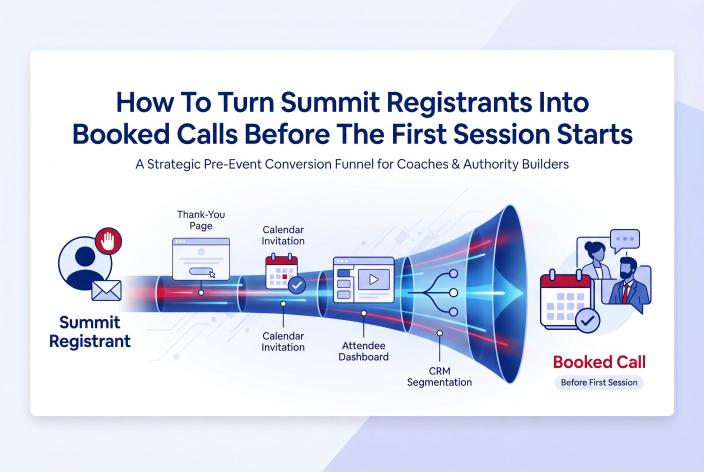
You can turn summit registrants into booked calls before the first session by treating the minute after someone registers as the start of a conversation. Put a short, honest invitation to a planning call on your thank-you page. Ask one or two registration questions that show who's ready, tag those answers in your CRM, and repeat the invitation in your welcome email and on the attendee dashboard before doors open.
This guide is for coaches, therapists, healing practitioners and other expert-led service owners who are good at the work but still see clients arrive in bursts. You've decided a summit is worth doing, or you're already planning one. What you want to know is how to make sure the people who are ready to talk don't have to sit through three days of sessions and a stack of sales emails before you give them a way to reach you.
Most hosts plan the pre-summit stretch around one goal, which is getting people to show up. That matters. But a few registrants sign up because they have a problem right now, and some of them would book a call today if you asked clearly. Here's how to ask without turning your event into a pitch.
Key Takeaways
- Add a short planning-call invitation below the VIP offer on your thank-you page (or on the page people see after buying VIP), so ready registrants can act while you have their full attention.
- Ask no more than two registration questions, and use the answers to decide who gets a direct invitation and who simply gets helpful reminders.
- Tag every registrant in your CRM by interest, timing, VIP status and promoter, so the right follow-up starts the moment they sign up.
- Mention the call once in the welcome email and once on the attendee dashboard, then let the summit do the trust-building.
- Build a simple pre-call page so the people who book arrive knowing who you help and what the call is for.
Why the Days Before Your Summit Are Such a Warm Window
Think about what someone has just done when they register. They read your headline, decided the topic touches a problem they have, and handed over their email. For a few minutes, and often for a few days, you have more of their attention than you'll get at almost any other point.
Most of that attention goes to "when does it start?" A smaller group arrives with a sharper need. They've been looking for help for months. Or a speaker they trust promoted your event and they want to know whether you're the person who can help them. Asking those people to wait until day three, then sit through a replay offer, slows them down for no good reason.
Jon Schumacher described a version of this in a podcast interview about one of his summits. Behind the premium pass he placed an application funnel instead of another one-click upsell. It was a page with a video of about four minutes explaining how his team helps and who they've helped, plus a calendar to book a call. He also linked that page from his welcome emails and other spots during the summit.
From roughly 2,800 opt-ins and about 250 pass buyers, around 20 people booked calls. He took about seven of those calls and closed three consulting engagements worth $75,000 together, though he said he'd need to check the exact figures. The detail I find most telling is that, to his knowledge, none of those three clients watched a single summit session. The summit got their attention and the booking page gave them a way in.
That's one host's result in a consulting business, and it doesn't predict what another host will see. It does show the shape of the opportunity.
Deciding Who Gets a Direct Invitation
Most registrants came to learn, and that's what they should get. Before day one, your job is to make the door easy to find for the few who are ready, while everyone else enjoys a calm, useful lead-up to the event.
Here's a simple way to read the signals you'll have:
| Signal | What it may mean | What to send |
|---|---|---|
| Bought the VIP pass | They've already invested and want depth | Call invitation on the VIP confirmation page and in VIP dashboard messaging |
| Answered "I want help with this in the next month" | Active need with a timeline | A short, personal email from you with a booking link |
| Came through a speaker's promoter link | They're borrowing trust from someone they already follow | Standard sequence, with the call mentioned once in the welcome email |
| Answered "just exploring" | Early stage, still gathering ideas | Reminders and good content now, an invitation after the summit |
| A fellow practitioner or likely referral partner | A relationship more than a sale | A peer conversation, or an invitation to speak next time |
By the way, those signals only exist if you collect them on purpose. That's what the next section is for.
Six Places to Make the Invitation Before Doors Open
You don't need all six. Two or three done well will serve you better than six done halfway. Start with the thank-you page and the registration questions, because the rest depends on them.
1. Add a Quieter Second Option to the Thank-You Page
The thank-you page already does two jobs in most summit funnels. It confirms the registration and it presents the VIP or all-access pass, often on the same page. You can add a third element lower down, for the person who wants more than recordings.
Keep it short and plain. For example, a career coach might write:
Already know you want help with your next career move? I've set aside some 20-minute planning calls before the summit starts. We'll look at where you are and whether my program is a fit. Pick a time below.
Then a calendar. Skip the long sales page and the countdown timer. The VIP offer stays the main ask on that page, and the call sits underneath for people who've already made up their minds. If your availability really is limited, say so. If it isn't, leave scarcity out.
If you'd rather keep the thank-you page focused on the pass, borrow Jon Schumacher's approach and put the invitation on the page people see after they buy VIP. Those buyers have already shown they'll invest in solving the problem, so a call feels like the obvious next step.
2. Ask One or Two Registration Questions That Show Readiness
Every extra field on a registration form adds friction, so ask the one question that changes what you'll do next. Good options:
- "What's your biggest challenge with [topic] right now?" with three or four answer choices
- "How soon are you hoping to make progress on this?" (This month / In the next few months / Just exploring)
- "Which best describes you?" with answer choices such as business owner, practitioner or someone supporting a family member
Multiple-choice answers are easy to tag and act on. Open text is great for hearing your audience's own words, so if you add a text box, make it optional. The same logic works for smaller events too, and I've written more about it in turning a free coaching workshop into a client qualification engine.
If you're a therapist or healing practitioner, keep these questions about interest and timing. A public registration form is the wrong place to ask about symptoms, diagnoses or personal history, and that information has no place in a marketing database. A well-written timing question tells you everything you need at this stage.
3. Tag Registrants in Your CRM the Moment They Sign Up
Answers sitting in a spreadsheet won't book anyone. They need to land in your CRM as tags that trigger the right follow-up while interest is still warm.
A simple tag set might be:
- summit-registrant (everyone)
- vip
- timing-this-month
- promoter-[speaker name]
- practitioner-peer
With those in place, your CRM can send the timing-this-month group a short email from you, written like a note from a person, soon after they register. The just-exploring group gets the standard reminders and nothing else. VIP buyers see the invitation on their confirmation page and again in their dashboard. Nobody has to sort the list by hand at 10 p.m.
4. Give the Welcome Email One Clear, Specific Line
Your welcome email arrives while the registrant is still thinking about your event. Its main job is logistics: dates, times, how to get in, how to add the sessions to their calendar. Let it do that job well.
Then add one line at the end. For example, a health coach running a summit on midlife energy might write:
P.S. If you're already sure you want help with this and don't want to wait until the summit ends, you can book a planning call with me here. It's a relaxed 20 minutes to see where you are and whether my program fits.
That's it. One line, one link, no pressure. The people who need it will find it.
5. Use the Attendee Dashboard Before Doors Open
Some registrants check the dashboard before day one to look at the schedule and the speaker list. That before-open period is a natural spot for a short block with a heading like "Want to talk before the summit starts?" and your booking link.
On EventRaptor, the dashboard can show different messages before it opens, while it's open and after it closes, and VIP attendees can see their own version. So VIPs can get a warmer, more direct invitation, while everyone else sees a lighter mention next to the schedule.
6. Let One Reminder Carry a Second, Smaller Purpose
Reminders exist to get people to show up, and that should stay their main job. One of them, often the reminder the day before, can carry a single line pointing to your booking page.
Once or twice across the whole pre-summit stretch is plenty. Keep the calendar invitation itself clean, with just the event details and the access link. If every message asks for a call, people stop reading the messages that help them attend.
Building a Booking Page That Warms People Up Before the Call
Getting the click is half the work. What happens between booking and the call decides whether the person arrives ready to talk or wondering why they booked.
Jon Schumacher's sequence is worth copying in spirit. After booking, people filled in a short questionnaire about where they were and what they wanted help with. Then they reached what he calls a pre-frame page with case studies, talks he'd given and a video explaining what would happen on the call, followed by reminder emails. He said the person behind his largest engagement had watched two hours of his content before they spoke.
Here's a checklist for your own version:
- A short video in your own voice covering who you help, what the call is for and what happens after
- One plain sentence saying who the call isn't meant for, so poor fits can step aside politely
- A calendar with realistic availability in the days before the summit
- Three to five questions after booking that help you prepare
- A confirmation page with two or three pieces of content worth watching first
- Reminder emails (and SMS if you use it) before the call
Therapists and practitioners need a few extra lines. Describe the call as a consultation to see whether your group program, workshop or practice is a fit, and say clearly that it isn't a therapy session. Never use testimonials or stories from therapy clients on this page. And check your licensing board's advertising rules before you publish anything.
Framing the Call So It Feels Like Help
The way you name and describe the call shapes who books it. A few principles I keep coming back to:
Name it honestly. "Planning call" or "fit call" tells people what to expect. Say what they'll walk away with even if they never buy, such as a clearer next step for the problem your summit is about.
Tie it to the summit topic. Someone who registered for a summit on rebuilding confidence after burnout wants to talk about exactly that. A generic "book a discovery call" link feels like it belongs on a different website.
Keep the lead-up education-first. Most of your pre-summit messages should help people get value from the event: which sessions to prioritize, how to prepare, what to bring. That generosity is a big part of why the ready few trust you enough to book. Prospects often choose their coach before the sales call ever happens, which I cover in becoming the obvious choice in your niche before anyone books a call.
And decide your offer early. I learned that the hard way at one of my own summits. I was too exhausted to put a proper offer together. Speakers and attendees loved the event, and it added 476 new people to our list, but it made only about $1,800 during the event. Those people will keep buying for years, so I still count it a success. The lesson stuck, though. If you haven't decided how ready people can take the next step, nobody takes it during the event.
A Simple Pre-Summit Timeline
Here's how the pieces fit together from registration to doors open:
| When | Touch | Who sees it |
|---|---|---|
| At registration | Thank-you page with the VIP offer and a quieter call invitation | Everyone |
| At registration | Tags applied from answers, VIP status and promoter link | Everyone (behind the scenes) |
| Within minutes | Welcome email with access details and a one-line P.S. | Everyone |
| Soon after | Short personal email with a booking link | "This month" answers and VIP buyers |
| Until doors open | Before-open dashboard block with the booking link | Anyone who visits the dashboard |
| Day before | Reminder with one line about booking | Everyone, or tagged groups only |
| After booking | Questionnaire, pre-call page and call reminders | People who booked |
Then the summit takes over. Your sessions, your speakers and your own presentation keep building trust, and your post-event follow-up picks up everyone who wasn't ready yet. I've mapped that later stretch step by step in mapping the journey from summit registrant to paying client.
Why the Pre-Summit Call Is One Door Among Several
The early bookings are the easiest wins, but they're a small slice of what a summit can do. Most buying happens later.
When Jennie and I ran Own Your Stage in February 2022, the first summit we ran on EventRaptor, we had about 600 registrations and 466 new people on our list. We sold 109 VIP tickets at $47, and we passed $24,000 in sales within two weeks of the event. By February 2024 that one summit had brought in more than $50,000 as new registrants kept buying. That's our own result, and it doesn't predict what another host will see.
Calls also happen during the event. Lucy Bedewi, a personality-driven copywriter, hosted the Out-Earn Your Man summit in September 2021, which we produced for her. She booked 4 discovery calls right after she presented, and all 4 became clients. This is one person's result, and it doesn't predict results for another host.
So the pre-summit invitation catches the people who are ready now. Your presentation catches the people who become ready while they watch you teach. Follow-up catches everyone else. I've watched plenty of coaches add hundreds of people to their list and convert few or none of them because nothing happened after the event. In my experience, a good follow-up process might turn 10 to 15% of those people into clients over time. That's a pattern I've seen, not a promise, and it depends on the offer, the audience and the follow-up itself.
What EventRaptor and Our Team Take Off Your Plate
Everything above can be stitched together with a page builder, a form tool, an email service, a calendar and a lot of copying and pasting. Plenty of hosts do it that way once. The second time, they usually want fewer moving parts.
On EventRaptor, the registration page, thank-you page and attendee dashboard are built in the same place as the event itself. Custom registration questions are available on plans that include them. The welcome email goes out the moment someone registers, and reminders are scheduled relative to the event start time, so if the date moves, the timing moves with it. Dashboard messaging changes automatically before, during and after the event, with a separate version for VIPs.
Registrants sync to GHL/CRMRaptor with tags, so your booking-email workflow can fire as soon as someone answers "this month" or buys VIP. The calendar they book on lives in that same CRM, next to the contact record. Promoter links show which speaker sent each registrant, which helps you tailor the first message and thank the right partner.
If you'd rather not build any of it, our done-for-you team can. We write the copy, build the pages, set up Zoom for the live sessions, connect the CRM and run the summit, so your job is to teach, host and make the offer. Jennie and I have run 13 summits of our own and over 40 summits for clients. Own Your Stage took us about 20 hours of admin on the platform. You can see the full set of tools in our virtual summit software features.
To be clear about limits: live sessions run on Zoom, and EventRaptor doesn't include in-event Q&A or polls. Video hosting for session recordings and replays is available through CRMRaptor, our GoHighLevel solution, and EventRaptor's video view analytics show how session and replay videos are viewed. For the pre-summit booking flow in this article, you won't need Q&A or polls.
Frequently Asked Questions
Will Asking for a Call Before the Summit Put Registrants Off?
It rarely does when the invitation is quiet, honest and easy to ignore. Keep the VIP offer or the event details as the main focus, mention the call once or twice, and make your other messages about helping people get value from the summit. The people who aren't ready simply scroll past, and the ones who are ready appreciate not having to wait.
How Many Summit Registrants Will Book a Call Before the Event?
There's no reliable average, because it depends on your offer, your audience, how clearly you frame the call and where you place the invitation. In one podcast example, a consulting host had around 20 calls booked from roughly 2,800 opt-ins after placing a booking page behind his premium pass. Treat early bookings as a bonus on top of the summit's main job of building trust and your list.
Should I Offer the Pre-Summit Call to Every Registrant or Only VIP Buyers?
Make it visible to everyone in a light way, such as a P.S. in the welcome email and a short block on the dashboard. Give a more direct invitation to VIP buyers and to people whose registration answers show they want help soon. That keeps your calendar filled with better-fit conversations instead of curious browsers.
Can Therapists and Healing Practitioners Use Pre-Summit Booking?
Yes, with care. Frame the call as a consultation about whether your group program, workshop or practice is a fit, state that it isn't therapy, and keep registration questions about interest and timing rather than symptoms or history. Never use testimonials or stories from therapy clients, and check your licensing board's advertising rules before publishing your pages.
Do I Need a CRM to Do This?
You can start with a thank-you page, a calendar link and a welcome email. Without a CRM, though, registration answers can't trigger different follow-up for different people, and the work falls back on you sorting lists by hand. A CRM with tags and workflows, such as GHL/CRMRaptor, lets the right message reach the right registrant without you managing it during an already busy launch.
Your Next Step Before Registration Opens
Pick one thing to do this week. Write the single registration question that tells you who's ready, and the three-sentence invitation that will sit under your VIP offer on the thank-you page. Those two pieces alone give you a way to spot and serve the people who signed up wanting help now.
If you'd like help placing those invitations inside a summit plan that fits your offer and your audience, Book your Client Attraction Planning Call. We'll look at how people find you today and sketch the pre-summit flow with you, including which parts our team could carry so you can focus on teaching.