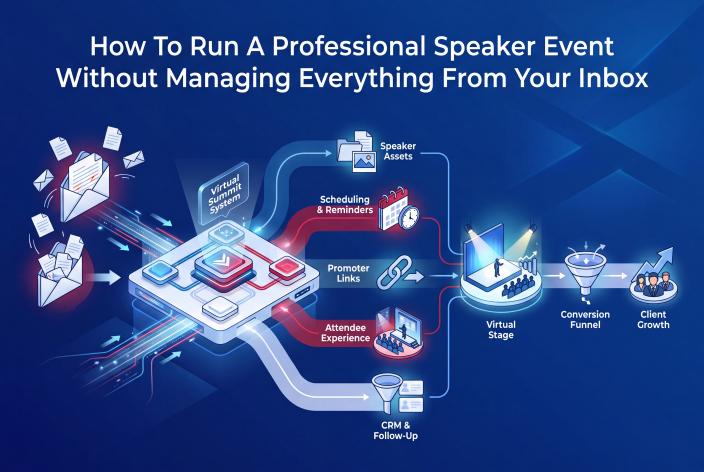
To run a professional speaker event without managing it from your inbox, map the whole event journey before you invite anyone. Then give speakers, attendees and follow-up one shared home. Applications, agreements, the schedule, promo links, reminders and CRM tags live in your event system, and your inbox goes back to short nudges and personal notes.
That's the answer. The rest of this article shows you how to set it up.
I'm writing for one kind of reader. You're a coach, a therapist or healing practitioner, or you run an expert-led service business. You're good at the work and clients get results, but they arrive in bursts. You can see why a summit, panel series or multi-speaker workshop would get you known in your niche. What worries you is the admin, because a speaker event can quietly turn you into a full-time switchboard for headshots, bios, Zoom links and "quick questions".
You can avoid most of that if you make a handful of decisions early.
Key Takeaways
- Before you send a single invitation, write down every item you'll need from each speaker and decide where it will live.
- Put the speaker's promotion commitment, including dates, in writing at the application stage and again in the speaker agreement.
- Give speakers one place to find their link, swipe copy, graphics and session details, because their inbox is as crowded as yours.
- Schedule attendee reminders off the event's start time so you never have to remember to send them by hand.
- Connect registrations to your CRM with tags before doors open, so follow-up starts while interest is warm.
Why Speaker Events Pile Up In Your Inbox
Every speaker brings a small bundle of moving parts. There's the topic, a bio, a headshot, a session title and description, a time slot, an agreement, a recording or a live Zoom session, a promo link and some swipe copy. Multiply that by 12 or 20 or 30 speakers and it adds up to hundreds of small items, and if each one arrives by email, you're the only person who knows where any of it is.
Then attendees join in. Where's the link? What time is it in my time zone? Is there a replay?
I know this from experience. My first summit, the Solopreneur Accelerator Summit, started on August 31, 2020, eight weeks after I left my job to start a coaching business. It had 27 speakers over four days, and I built it in two weeks with no summit system, working 16 to 18 hours a day. I don't recommend that timeline. It worked (my list grew from about 100 people to 750), but a lot of that time went on chasing things that should have been sitting in one place.
Speakers feel the same pain from the other side. On one podcast episode, speaker Trena Little said plainly that her email is a disaster, and that anything important a summit host sends her there is unlikely to be found. Her favorite host put the affiliate link, swipe copy and graphics in one location she could go back to, with short tutorials on getting her link right.
That's the whole principle in miniature. When everything has a home, speakers promote more easily and you stop answering the same question 20 times. For the bigger picture of what scattered tools cost a coaching business, see the hidden cost of running coaching events from spreadsheets and scattered tools.
Map The Event Journey Before You Invite A Single Speaker
Most hosts start by inviting speakers. It feels like progress. But once speakers say yes, the questions start, and if you haven't decided the answers yet, you make them up one email at a time.
Do this first instead. It takes an afternoon.
- Decide what the event is for. Name the offer people will be invited to after the event: a program, an intensive, a group, a waitlist or a planning call. Everything else hangs off this. One of my summits was loved by speakers and attendees and added 476 new people to our list, but I was too exhausted to put a proper offer together, and it made only about $1,800 during the event. Those people will keep buying for years, so I still count it a success. I'd still build the offer first next time.
- Set the key dates. Registration opens, speaker materials due, promotion starts, event days, replay window, follow-up window.
- List what you need from each speaker. Topic, bio, headshot, session title, short description, agreement, recording or live slot, and a commitment to promote.
- Decide where each item lives. Use the table below as a starting point.
- Decide what happens after someone registers. Which tags they get in your CRM, which emails they receive, and what the next step is for people who want help.
If you're new to the format, what a virtual summit is and how coaches and experts use one covers the basics before you plan the details.
Where Each Piece Of The Event Should Live
| Item | Where it ends up when you wing it | Where it belongs |
|---|---|---|
| Speaker application and topic | Email replies and DMs | An application form tied to the event |
| Bio, headshot, session title | Attachments spread across threads | The speaker's profile and session record |
| Agreement and promotion commitment | A PDF sent back and forth, or nothing in writing | An agreement signed in the platform, with status you can check |
| Session time | A spreadsheet that drifts away from the website | The event calendar, which feeds the schedule pages |
| Promo links and swipe copy | A shared doc nobody can find | Each speaker's own promoter link plus one assets page |
| Attendee reminders | Emails you remember to send | Emails scheduled off the event's start time |
| Who registered and from where | CSV exports pasted into your CRM | Registrations synced to GHL/CRMRaptor with tags |
Once this table is filled in, your speaker invitation gets much simpler. You can tell people exactly what happens next, which makes you look organized before they've even said yes.
Give Speakers One Place To Do Everything
The speaker experience is where a host looks most or least professional. Speakers talk to each other, and they remember who made their life easy.
Applications And Invitations
Make the invitation short and personal, then point to the details instead of pasting them in. A one-page summary works well here: the event's topic, who it's for, dates, what you're asking of speakers and what they get in return. Speakers receive a lot of requests, and a single clean page helps yours stand out.
From there, send interested speakers to an application or a direct invitation linked to the event, so their answers land in one list you can review, tag, accept or decline. Every reply stops being a separate email to file.
Agreements That Spell Out Promotion
The biggest frustration in managing speakers is getting them to promote. Jackie, who manages speakers on a summit production team, said on one podcast episode that some speakers won't promote even after agreeing to, however hard you work at it. She also warned that speakers have pulled out when the summit's direction drifted from the topic they were first pitched.
Two things help with both problems:
- Ask for a promotion commitment in the application, and confirm it in the speaker agreement along with the dates they'll promote.
- Write the topic and audience into the agreement too, and stick to them.
There's a third thing that works well. Put the promotion start date on each speaker's calendar, so nobody can say they missed it.
Assets In One Location
Take Trena's advice literally. One page per event, or one dashboard, with the speaker's link, swipe emails, social posts, graphics and their session details. When a speaker writes in asking for their link, you reply with the same address every time.
Build The Schedule From Speaker Records
Hand-built schedules break. A speaker swaps slots, you update the spreadsheet, then forget the website, then the reminder email, then the speaker's own page.
The fix is to treat each speaker's session record as the single source. Their name, photo, bio, title and time slot are entered once. The calendar, the public schedule, the speaker pages and the attendee dashboard all read from that record, so changing a time in one place changes it everywhere.
On event day, the same records feed your run of show, so you and anyone helping you can see what's live and what's next. A presentation timer keeps sessions on time without awkward hand signals.
Make Promotion Easy To See
Speakers promote more when they can see that promotion counts. Give every speaker a unique promoter link, then show the results on a leaderboard they can view.
If you run a leaderboard contest, keep it modest the first time and set a minimum for prizes (for example, a minimum number of registrations), so you're not paying out a big reward when only a couple of speakers promoted. Be clear about the rules and deliver prizes when you said you would.
Promoter links also answer a question that matters long after the event: who brought in your best attendees? Over the years, more than 5,000 people on the EventRaptor list came from other speakers promoting our summits. We could only know that because every registration was tied to a promoter link.
Let Reminders And Attendee Access Run On The Event's Clock
Attendees need four things: where to register, when to show up, how to get in and what happens afterward. Each of those can be a page or an email that runs on the event's own timing.
- A registration page and a thank-you page that tells them what to do next.
- A welcome email, then reminders scheduled relative to the start time.
- An attendee dashboard with the schedule and Zoom join links, which opens a set number of minutes before each session.
- Follow-up emails that start when the event ends, not when you get round to them.
If the start time moves, scheduled reminders move with it. That alone saves a surprising number of panicked emails.
Connect The Event To Follow-Up Before Doors Open
This step gets skipped more than any other. A host adds hundreds of people to the list, then the event ends, everyone's tired, and the follow-up never really happens.
In my experience, a good follow-up process might turn 10 to 15% of registrants and attendees into clients. That isn't a promise for your event, and it doesn't happen on its own. "Build it and they will come" is a myth.
So set up the follow-up before the event goes live:
- Registrants sync to your CRM with tags for the event, VIP status and the promoter who referred them.
- Speakers sync too, with tags that change as their session moves from applied to accepted to scheduled.
- Your follow-up emails and booking calendar sit in the same CRM, so a person who attended a session on your topic can be invited to the right next step without you exporting a single spreadsheet.
At EventRaptor, the event runs on our platform and the contact records, workflows and calendar sit in GHL/CRMRaptor. Because the two are connected, a registration becomes a tagged contact the moment it happens, and your follow-up can start right away.
What EventRaptor And The Done-For-You Team Take Off Your Plate
Jennie and I built EventRaptor because there was no summit system that worked for our coaching clients. We designed it around a real person, a 70-year-old group coaching client who'd only been using computers for two or three years. In December 2021, she ran a virtual summit with twelve speakers on EventRaptor without help from anyone else. That's one person's experience, and it doesn't predict how anyone else's event will go, but it shows the kind of host we had in mind.
Our own numbers tell a similar story. Own Your Stage, the first summit Jennie and I ran on EventRaptor in February 2022, took about 20 hours of admin. It brought in about 600 registrations and 466 new people to our list. Those are our results as hosts, not a forecast for yours.
Here's what changes in practice when you run a speaker event on the platform:
- Speakers apply, sign their agreement and, on plans that include it, upload their files in the platform. You can even require a signed agreement before a session can be placed on the calendar.
- The schedule, speaker pages and attendee dashboard come from the session records, so nothing gets rebuilt by hand for each speaker.
- Every speaker gets a promoter link, and the leaderboard shows who's promoting.
- Reminders and follow-up emails run on the event's timing.
- Registrants and speakers sync to GHL/CRMRaptor with tags.
If you'd rather not touch the setup at all, our done-for-you team can run the whole summit. That includes work you won't see as self-serve features: we write session descriptions and speaker introductions, set up the Zoom meetings, create cover images and sync sessions to Google Calendar. Your job is to teach, host and make your offer. We've hosted 13 summits of our own and over 40 summits for clients, and on the most recent summit we produced, several attendees and speakers told us it was "the best run summit they had ever seen".
To be honest about the limits, live sessions run on Zoom, and EventRaptor doesn't include in-event networking, Q&A or polls. If those matter to your format, plan for them in Zoom. Video hosting for session recordings and replays is available through CRMRaptor, our GoHighLevel solution, so you don't need a separate video host. You'll find the full list, organized by job, on our virtual summit software features page.
A Note For Therapists And Healing Practitioners
Everything above applies to you, with a few extra points covered in more depth in our guide to virtual summits for therapists.
A speaker event lets you teach instead of sell. It puts you alongside respected peers, which builds trust and professional referral relationships. Keep the framing educational. Summit sessions aren't therapy, so say that clearly on your registration page and in speaker briefings.
Add a line to your speaker agreement asking presenters not to share client stories or testimonials from therapy clients, and keep claims about outcomes out of session titles and descriptions. Check your licensing board's advertising rules before you publish the pages and promo copy, since speakers will be sending your materials to their own audiences.
If a full summit feels like too much right now, a smaller format may suit you better. Here's how to run a micro event that builds authority without taking on a full summit.
Your Pre-Invite Checklist
Work through this before the first invitation goes out:
- The offer attendees will be invited to after the event is written down
- Key dates are set: materials due, promotion start, event days, replay window
- A one-page speaker summary is ready to link from your invitation
- The application or invitation form collects topic, bio, headshot and promotion commitment
- The speaker agreement covers topic, session date, promotion dates and (for practitioners) no client stories
- Every speaker will get a promoter link and access to one assets page
- Welcome, reminder and follow-up emails are scheduled off the event's start time
- Registrants and speakers sync to your CRM with tags
- Your booking calendar or next-step page is live before doors open
If you can tick all nine, your inbox will be far quieter than you expect.
Frequently Asked Questions
What Should I Send Speakers When I First Invite Them?
Send a short, personal email and link to a one-page summary of the event. The page should cover the topic, who it's for, the dates, what you're asking of speakers and what they get in return. Speakers get many requests, and a clear page helps them decide quickly without a long back-and-forth.
Can I Run A Multi-Speaker Event On My Own?
Yes, if the event runs from one organized system instead of your inbox. One of our coaching clients, who was 70 and had only been using computers for two or three years, ran a twelve-speaker summit on EventRaptor in December 2021 without help. That's one person's experience, so if you'd rather hand the work over, a done-for-you team can run it for you.
What Should A Speaker Agreement Cover?
At a minimum, it should cover the topic and audience, the session date and format, what the speaker will deliver and by when, and their promotion commitment with dates. Writing promotion into both the application and the agreement makes it clear from the start. Therapists and practitioners should also ask speakers not to use client stories or testimonials from therapy clients.
Does EventRaptor Host The Live Sessions?
No. Live sessions run on Zoom, and EventRaptor puts the Zoom join links on the attendee dashboard and in the event's emails. EventRaptor handles the registration, speakers, schedule, promoter links, reminders and CRM sync around those sessions.
Your Next Step
This week, copy the table from this article onto a blank page. Next to each item, write where it will live for your event and who's responsible for it. If you can't fill in a row, you've found the part that would end up in your inbox.
If you'd like help deciding whether a summit, a smaller speaker event or a series fits your offer, and what we could take off your plate, Book your Client Attraction Planning Call. We'll look at what you sell, how people find you now, and what a well-run speaker event would need to do for your business.