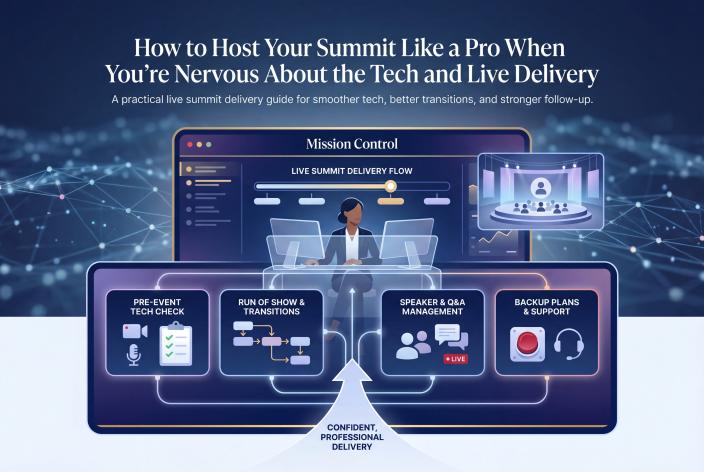
If going live in front of a few hundred people makes your stomach drop, you can still host a summit that feels calm and professional. Prerecord most of the teaching. Keep live only the parts that gain something from it, like your welcome, short speaker intros and Q&A. Rehearse the tech once with every live speaker, and on the day hand the buttons to someone else so your only job is hosting.
That's the short answer. The rest of this article fills in the details.
I'm writing this for the coach, therapist or expert-led service provider who's good at the work and has helped plenty of people, yet still sees clients arrive in bursts. You've heard a summit can change that. What stops you is a picture in your head: a frozen screen, a speaker who never turns up, and you sitting in silence while people leave.
Those things do happen. They're also very manageable once you know where they come from and who's responsible for each one.
Key Takeaways
- Prerecord the main talks for your first summit and go live only for welcomes, intros and Q&A, so one tech hiccup can't sink a session.
- Test your own setup a week out, then run a short tech check with every speaker who'll be live.
- On the day, one person runs Zoom, another watches the chat and collects questions, and you host. Never host and produce at the same time.
- Have a backup for every likely failure: a spare laptop and internet connection, a prerecorded session you can play, and a short masterclass you can teach if a speaker doesn't show.
- Before the event, decide how registrants will be tagged and followed up, because the live days only pay off if the conversations carry on afterward.
Why Live Delivery Feels Harder Than It Is
I know this fear well. I'm an engineer and a self-confessed tech and automation nerd, so the software never scared me. Speaking did. I'm an extreme introvert, and speaking for four minutes at a monthly company meeting used to terrify me.
My first summit, the Solopreneur Accelerator Summit, started on August 31, 2020, eight weeks after I'd started my coaching business. It had 27 speakers over four days. For the first two days I barely introduced myself. On day three I started pushing through the fear, and that was the start of a long process of getting over it.
The summit worked anyway. My list grew from about 100 people to 750, and I made about $5,500 from course places and VIP tickets. Nobody needed me to be polished. They needed the event to run smoothly and the speakers to be worth hearing.
Tim Corcoran described something similar on the Virtual Summit Strategies podcast. Of his 25 prerecorded sessions, the hardest was the very first Zoom interview. When he hung up, he said he felt like a complete success. For most hosts, nerves peak before the first session and ease quickly after it.
And most of what actually goes wrong on the day is logistics: wrong links, missing speakers, slow internet, emails going out at the wrong time. Preparation and clear roles fix logistics. Once the logistics belong to someone else, being on camera feels much smaller.
Choose a Format That Matches Your Confidence
You don't have to go fully live to run a strong summit. If you're new to the format, this overview of what a virtual summit is and how coaches use one covers the basics. Here's how the three delivery formats compare:
| Format | What's live | Best for | Main risk |
|---|---|---|---|
| Fully prerecorded | Nothing, or a short welcome | First-time hosts, anyone anxious about tech | Feels less interactive unless you add a live Q&A |
| Hybrid | Live intro, prerecorded talk, live wrap-up and Q&A | Most coaches and practitioners | Someone has to switch smoothly between recording and live |
| Fully live | Every session | Hosts at ease on camera, with a production helper | No-shows and outages happen in front of everyone |
Sophia Clark, an interior designer who ran a summit in her niche, gave clear advice on the podcast. If tech breakdowns and scheduling scare you, prerecord your first summit. You'll have more control, and you can try live sessions next time once you know what to expect. Prerecorded talks also let attendees watch on their own schedule, which suits busy people who can't block out a full day.
Sherri Starr and Jesse Cox ran their Make Your Business Real Summit live. Some speakers preferred to prerecord, so they did a live intro, played the recording, then came back live for the wrap-up and Q&A. Attendees got the energy of a live session, and the speaker didn't have to worry about their connection mid-talk.
For most people reading this, I'd suggest the hybrid. It gives you real interaction without betting a whole session on one Wi-Fi signal.
The Tech Check That Prevents Most Day-Of Problems
Most tech disasters can be seen coming a week early if someone looks. Here's the order I'd follow:
- Test your own setup seven days out. Check your internet speed, plug in a wired connection if you can, and test your mic, camera, lighting and Zoom version. Cheryl Moses, who ran a livestreamed summit, said afterward that she needed faster internet because her audio kept breaking up.
- Put together a backup kit. Tucker Max ran a five-day live workshop with a full backup set ready: computer, camera, mic and Ethernet cable. Two separate things broke at his house during the event. Because the backups were ready, the show kept going.
- Run a short tech check with each live speaker. Confirm their audio, camera and screen share, how they'll join, and the time zone of their slot. Ten relaxed minutes now saves a stressful five minutes on air.
- Click every link in every email and on every page. Summit tech specialist Stacy Braiuca said two of the most common failures are emails that don't go out at the right time and links that break because something changed after the emails were written.
- Do one full dress rehearsal with your producer. Open Zoom, play a recording, switch back to live, take a test question and end the session. Doing it once removes most of the mystery.
- The night before each live day, message every speaker. Sherri Starr texted or DMed each next-day speaker with their time and personal Zoom link, plus a number to text if anything came up, and asked them to reply to confirm. Nobody was late.
Who Does What on the Day
Solo hosts end up overwhelmed because they try to be presenter, technician and receptionist at once. Chris Krimitsos described how the Podfest Masterclass Summit split the work. Each track had three people behind the scenes: one on the tech, one moderating the chat and Q&A, and one who built the lineup and introduced the speakers.
You don't need a crew that size. You do need the jobs separated:
| Role | What they do | Who it can be |
|---|---|---|
| Host (you) | Welcome, speaker intros, interview questions, mention of your offer | You |
| Producer | Starts Zoom, plays recordings, admits speakers, handles screen share and recording | A VA, a business partner, or our team |
| Chat and Q&A moderator | Greets people in chat, posts links, gathers and sorts questions | An assistant or a colleague |
| Speaker wrangler | Confirms speakers, resends links, keeps the next speaker ready backstage | Often the producer on a small event |
Sherri and Jesse split it simply. Sherri wrote and delivered the speaker intros and kept in touch with speakers. Jesse made sure Zoom and the sound were working, and switched between two computers because the VIP sessions ran on a separate platform.
On a small summit, one helper can cover producer and wrangler. Keep yourself out of the tech seat, though. Your attention belongs on the speaker and the audience.
Scripting Transitions So You Never Freeze
The moments that make nervous hosts freeze are the gaps: the handover from one speaker to the next, the silence after a short answer, the speaker who won't stop talking. Script those gaps and they stop being scary.
- Write every intro in advance and keep each one under a minute: the speaker's name, who they help, and why this session matters to this audience.
- Tape three backup questions just below your camera, so you can glance down without looking away.
- Know which questions you'll drop if a session runs long, and keep two extra ready in case it runs short.
- Practice a kind interrupt: "I'm going to jump in here because I don't want anyone to miss this."
- Keep a wrap-up line ready: "As we start to wrap up, let's cover one last point."
A simple handover might sound like this:
"Thank you, Maria. If you want her checklist, the link is in the chat now. Up next is James, who's going to show you how to price a group program without second-guessing it. We'll start in two minutes, so grab a coffee."
That's all a transition needs. Say thank you, point to the next action and introduce what's coming. Nobody is grading your delivery.
Running Q&A Without Losing Control
Live sessions on EventRaptor run on Zoom, so Q&A happens in the Zoom chat or Zoom's own Q&A tool. EventRaptor doesn't have built-in Q&A or polls, and I'd rather you know that before you plan.
What works is a simple routine. The moderator asks people to post questions early, groups similar ones together and passes the best three or four to you. You read each question aloud before the speaker answers, which keeps replay viewers in the loop. Keep one seed question ready in case the chat is quiet at the start.
A Note for Therapists and Healing Practitioners
If you're a therapist or practitioner, open each live session by saying it's educational and isn't therapy or individual advice. Ask attendees not to share personal health details in the chat, and answer questions in general terms. For example, a couples therapist hosting a summit might answer "What helps when arguments keep repeating?" with general principles, then point people toward finding professional support. Check your licensing board's advertising rules for how you describe yourself and your services in promotion and on the live call.
Breaks, Timing and Keeping the Day on Schedule
Running over time drains everyone. Build a five or ten minute break after every couple of sessions. Your speakers get a buffer, attendees get a breather, and you get a moment to reset.
EventRaptor gives summits a few timing tools that help here:
- A full-screen presentation timer with warnings as a session nears its end, break notes, and instructions for speakers. A stage manager can open it from a shareable link without logging in, from 96 hours before the event until it ends.
- A run of show dashboard that shows what's happening now and what comes next.
- A printable program at a glance for your team and speakers.
- A "doors open" setting that controls how many minutes before the start attendees can get in.
With a countdown visible to the speaker, you won't need to cut anyone off awkwardly. The timer does it for you.
Backup Plans for What Most Often Breaks
Cheryl Moses had speakers miss their slots at the last minute and no backup plan, so the stream simply paused until the next session. She said that next time she'd have something ready to fill those gaps. Here's what to prepare:
| Problem | Prepare in advance | What to do on the day |
|---|---|---|
| A speaker doesn't show | One or two prerecorded backup sessions, plus a short masterclass you could teach | The producer plays a backup, or you teach for 20 minutes |
| Your internet or laptop fails | A second device already logged into Zoom as co-host | The producer keeps the session running until you're back |
| Zoom drops or splits the room | A short message ready to post on social media and send by email | Ask everyone to leave Zoom and rejoin |
| A link is broken or an email is late | Every link tested, with the correct versions in a shared doc | Fix it quietly, and the moderator posts the right link |
| A session runs long | A list of questions you're willing to drop | Cut questions and protect the next slot |
Tucker Max described Zoom dropping his webinar and bringing people back into two separate rooms. His team told everyone to close Zoom and rejoin, and he estimated they lost only 5 or 10% of people.
For small glitches, fix them without making an announcement. Most attendees never notice. It also helps to say at the start that the summit is live and there may be a bump or two. People are generous when you've told them up front.
Sherri and Jesse kept backup presentations ready, plus topics they could teach as a masterclass if someone didn't turn up. That kind of preparation turns a no-show into a small reshuffle.
Connecting the Live Days to Follow-Up
A smooth event that leads nowhere is still a disappointment. I learned this the hard way. At one summit I was too exhausted to put a proper offer together. Speakers and attendees loved it, and it added 476 new people to my list, but it made only about $1,800 during the event. Those people will keep buying for years, so I still count it a success. Even so, it taught me to finish the offer before the live days start.
The same goes for follow-up. After we built EventRaptor, I saw plenty of hosts run a good summit, add hundreds of people to their list and convert few or none, because they had no process for turning registrants into clients. In my experience, a good follow-up process might turn 10 to 15% of them into clients. That's my experience, not a promise.
So before your first live session, decide:
- Which tags mark registrants, VIP buyers and people who came through each speaker's promoter link.
- Which email goes out after each day, and what it invites people to do.
- Where the booking link goes, and who follows up with people who book.
EventRaptor syncs registrants to GoHighLevel/CRMRaptor with tags, and reminder and follow-up emails run on the event's own timing. Your live delivery and your follow-up then work from the same records, with nothing copied over by hand. If your calendar is already full of client work, this guide to building a client attraction system that keeps working when you're busy covers the follow-up side in more depth.
Follow-up can start straight after a session. Lucy Bedewi of My Write Hand Woman hosted the Out-Earn Your Man summit in September 2021, which we produced for her on EventRaptor. She booked 4 discovery calls right after she presented, and all 4 became clients. That's one person's result, and it doesn't predict what another host will see.
What EventRaptor and Our Team Take Off Your Plate
We designed EventRaptor around a real person: a 70-year-old group coaching client who had only been using computers for two or three years. In December 2021 she ran a virtual summit with twelve speakers on EventRaptor without help from anyone. If tech is what's holding you back, I hope that tells you something.
Before the event, speakers apply, sign agreements and upload what's needed through the platform, so you're not chasing email threads. The schedule, speaker pages and attendee dashboard all come from the speaker and session records, so nothing gets rebuilt by hand. If you'd like the full picture, here's how EventRaptor's summit features are organized by job, and here's how to run a speaker event without managing it all from your inbox.
If you'd rather not touch the setup at all, our done-for-you team can run the whole summit. We set up the Zoom meetings, write speaker introductions and session descriptions, and handle production, so your job is to teach, host and sell. After the most recent summit we produced, several attendees and speakers told us it was "the best run summit they had ever seen."
To be clear about what's included: EventRaptor has video view analytics, so you can see how session and replay videos are viewed, and video hosting is available through CRMRaptor, EventRaptor's GoHighLevel solution, so your recordings and replays don't need a separate video host. EventRaptor doesn't have in-event networking, Q&A or polls. Live sessions run on Zoom.
Your Day-of Checklist
- Wired internet connected, backup device logged in as co-host
- Mic, camera and lighting tested in the room you'll use
- Every speaker confirmed the night before, with their link resent
- Backup session and masterclass outline ready to go
- Speaker intros and three backup questions next to your camera
- Presentation timer link shared with your producer
- Chat moderator has the links to post and the Q&A routine
- Offer and VIP mention scripted for the right moments
- Follow-up emails and tags checked before doors open
Frequently Asked Questions
Should My First Virtual Summit Be Live or Prerecorded?
For most first-time hosts, prerecord the main talks and keep a few short live moments, such as your welcome, speaker intros and Q&A. You get control over quality and timing, and attendees can watch on their own schedule. Once you've run one, you'll know whether more live sessions suit you and your audience.
What Equipment Do I Need to Host Live Summit Sessions?
You need a reliable wired internet connection, a decent external mic, a camera and steady lighting. Keep a second device logged into Zoom as co-host, and have a spare cable or mic if you can. Test everything a week ahead in the room you'll actually use.
What Should I Do If a Speaker Doesn't Show Up?
Have one or two prerecorded backup sessions ready, plus a short masterclass you could teach yourself. Your producer plays the backup or hands over to you, and the schedule carries on. Messaging every speaker the night before with their time and link cuts the risk a lot.
How Many People Do I Need to Run a Summit on the Day?
Two is a workable minimum: you as host and one person producing and handling speakers. A third person watching the chat and gathering questions makes the day much calmer. With a done-for-you team, the production side is covered for you.
Can Therapists Host Live Q&A During a Summit?
Yes, as long as the session stays educational. Say at the start that it isn't therapy or individual advice, ask people not to share personal health details in the chat, and answer in general terms. Check your licensing board's advertising rules for how you present yourself and your services.
Your Next Step
This week, pick your format and put one dress rehearsal date in the calendar. A single run-through with your producer, playing one recording and taking one test question, will take more of the fear out of the day than anything else in this article.
If you'd like help deciding how much of your summit should be live, and how the live days connect to your follow-up, Book your Client Attraction Planning Call. We'll look at your offer, how you're currently finding clients, and the kind of event that would suit you, whether you run it yourself on EventRaptor or have our team produce it with you as host.