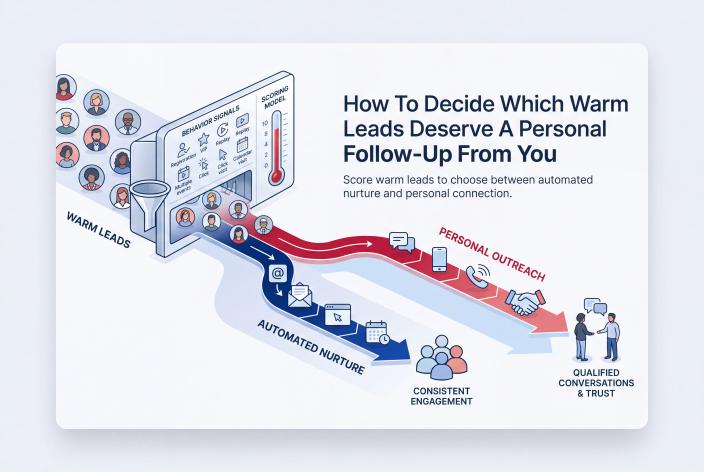
Some warm leads should hear from you in person. These are the people who have done something that cost them effort or money. They replied to an email, bought a VIP pass, described a specific problem on a registration form or asked how working with you works. Everyone else should get steady, useful automated nurture until their behavior changes.
That's the short answer. The rest of this article shows how to put it into practice without a spreadsheet you'll abandon by Thursday.
I'm writing for the coach, therapist or healing practitioner who's good at the work and has helped plenty of people, but whose clients still arrive in bursts. You finish a summit, a workshop or a busy month of content with a list of names, and you've no idea who to contact first. So you either email everyone the same thing or nobody at all.
Jennie and I watched this happen with our own customers. EventRaptor made running a summit easy, yet many hosts added hundreds of people to their list and turned few or none of them into clients. In my experience, a good follow-up process might turn 10 to 15% of those people into clients over time. That's my experience, not a promise, and none of it happens if every lead gets the same treatment.
Key Takeaways
- Save your personal time for leads who've shown effort or spent money, such as a reply, a VIP purchase or a detailed answer to a registration question.
- Give each behavior a few points, add them up, and set two thresholds: one for a light personal touch and one for a direct invitation to talk.
- Score fit and interest separately, because a very eager lead who isn't a fit still shouldn't take up a sales call.
- Let automation carry welcome emails, reminders, teaching emails and segmented nurture for everyone, so your personal messages stay rare and worth reading.
- Write each personal follow-up around what the person did or said, ask one question and leave the pitch out.
Why Personal Follow-Up Only Works When the Group Is Small
Personal follow-up feels like the respectful thing to do. And it is, up to a point. But nobody can write 300 thoughtful notes after an event, and when people try, the notes slowly turn into a template with a first name pasted in. Readers can tell.
Ivy Slater made this point well on the podcast when talking about summit speakers. You might have 12 to 20 of them. That's a small enough group to write to one by one, mentioning a tip each person gave, so don't mass email them. The same logic applies to leads. Personal follow-up stays personal when the group is small enough for you to care about each name.
So your job is to shrink the group. Lead scoring is how you decide who's in it.
Which Behaviors Show Buying Intent and Which Show Curiosity
Some actions take two seconds. Others take thought, time or money. The second kind tells you far more.
| What the person did | What it usually tells you | Weight |
|---|---|---|
| Registered for a free event or downloaded a freebie | Curious about the topic | Low |
| Opened a few emails | Paying some attention | Low |
| Showed up live and asked a question in the chat | Engaged with you, not just the topic | Medium |
| Answered a registration question with a specific, personal problem | Knows what they're struggling with | Medium |
| Clicked through to your offer or booking page | Exploring the next step | Medium |
| Bought a VIP pass or a small paid product | Willing to invest in this problem | High |
| Replied to an email with details about their situation | Wants a conversation | High |
| Asked how working with you works, or about price | Actively deciding | High |
| Was introduced by a past client or a speaker who knows them | Arrives with borrowed trust | High |
Effort and Money Say More Than Attention
Opens and registrations are worth tracking, but they're cheap. Someone can open every email you send for a year and never be closer to buying. A reply, a purchase or a question about your process means the person has stepped toward you. Weight those heavily.
Your Registration Form Can Do Some of the Sorting
One good question on your registration page can tell you who's serious before the event starts. Something like "What's the one thing you most want help with right now?" works well. Someone who writes "stuff" and someone who writes three sentences about their stalled practice are telling you different things. Read the long answers. They're often the first sign of a future client.
For more on reading the subtle signs that show up before someone books, see spotting the quiet buying signals in your coaching CRM.
A Simple Lead Scoring Model You Can Set Up This Week
You don't need a complex model. You need one you'll actually use. Here's a starting version. The point values are examples to adjust, not tested benchmarks.
- List the six to eight behaviors you can actually see. Use the table above, but only keep what your tools or your own eyes can capture.
- Give each one points. For example, 1 point for a registration or freebie, 2 for showing up live and asking a question, 3 for a detailed registration answer or a click to your offer page, 5 for a VIP purchase, a reply about their situation or a question about working with you.
- Set two thresholds. For example, 5 points means a light personal touch and 8 or more means a direct, personal invitation to talk.
- Turn each behavior into a tag in your CRM. Tags such as "vip-buyer" or "replied-post-event" let you filter quickly instead of reading every record.
- Review the list on a fixed day each week. Fifteen minutes on a Friday is plenty for most practices.
Here's how the tiers might look in practice.
| Score (example) | Tier | What happens | Who does it |
|---|---|---|---|
| Under 5 | Curious | Teaching emails, event invitations, a standing invitation to reply | Automation |
| 5 to 7 | Warming | Automation continues, plus a short personal note or voice message | You, briefly |
| 8 or more | Ready to talk | A personal message inviting a conversation, with your booking link | You, personally |
Let Old Interest Cool Down
A VIP purchase from eight months ago isn't the same as one from last week. Pick a simple rule, such as dropping a lead back a tier if they've done nothing new in 60 days. Otherwise your "ready to talk" list fills up with people who've long since moved on, and you'll start ignoring it.
Keep Fit Separate From Interest
Score tells you how interested someone is. It says nothing about whether you can help them. A very eager lead who works in a niche you don't serve, wants a discount before they've heard the offer or needs something outside your scope still shouldn't take a sales call slot. Add one quick yes or no for fit before anyone moves into the top tier. It protects your calendar from the draining calls you already know too well.
What Automation Should Carry for Every Lead
Automation is how you stay in touch with the large middle of your list, the people who are interested but not ready, without forgetting them. Done well, it makes follow-up feel more personal because it arrives on time and speaks to where the person came from.
For most coaches and practitioners, that means:
- a welcome email that confirms what they signed up for and what happens next
- reminders before live sessions and replay deadlines
- a short run of teaching emails on the problem they told you about
- one line in every email that invites a reply, so a curious lead can raise their hand at any time
- a monthly invitation to your next event or workshop
Segment by source. Meg Casebolt described how she sends people who arrive from a summit to a landing page that welcomes them from that event and speaks to that audience. She then duplicates her email sequence and rewrites the opening lines so it feels like a continuation of the summit. She still sends the same seven emails, with slightly different words. It doesn't take long, and it makes people feel expected. Her follow-up also invites them to reply with a specific question and start a conversation. That reply is exactly the high-weight signal your scoring model is waiting for.
One more idea worth borrowing: when you interview speakers, jot down a specific tip each one shared while you're still in the post-production notes. Your team can drop those details into the automated follow-up for that speaker's audience. The emails are still automated, but they now refer to something real.
If you want a day-by-day version of this after an event, the 14-day post-summit follow-up plan splits the work between what to automate and what to write yourself.
What a Good Personal Follow-Up Looks Like
When someone crosses your threshold, keep the message short. Mention the thing they did, ask one question and leave the door open. Write it while the signal is fresh, ideally within a day or two.
For example, a business coach might write to someone who bought a VIP pass and described their problem on the registration form:
Hi Dana, I saw you grabbed the VIP pass, thank you. You mentioned on your registration that referrals have dried up since spring. Did any of the sessions give you an idea you want to try first? If it'd help to talk it through, here's my calendar.
That's it. No stack of bonuses, no countdown. The message shows you noticed her, and noticing is what builds trust at this stage.
Timing matters most right after you've taught. Lucy Bedewi, a personality-driven copywriter, hosted the Out-Earn Your Man summit in September 2021, which EventRaptor produced for her. She booked 4 discovery calls right after she presented, and all 4 became clients. That's one person's result, and it doesn't predict what another host will see. But it shows where personal attention pays off: with the people who raise their hands while your teaching is still fresh in their minds.
Speakers and Partners Always Get the Personal Touch
Your speakers and promoters aren't leads in the usual sense, but they're some of the warmest relationships you have. Ivy Slater suggests a personal thank-you note (she's a fan of real mail, because physical mailboxes are almost empty). Then send a personal email around 30 days later that refers to a tip they gave, and around 60 days later, get on the phone for a debrief about what the summit did for them. Never score these people. Put them on your calendar.
A Note for Therapists and Healing Practitioners
Everything above applies to private practice too, with a few extra guardrails. Keep personal follow-up about your workshops, groups or how to book a consultation, and keep clinical details out of email and text. Some people will share personal struggles on a registration form. Don't quote that back to them in a message that could be read by someone else. Make it clear that summit or workshop content for therapists is education, not therapy. And check your licensing board's advertising and solicitation rules before you send any direct outreach, because some boards have specific expectations about contacting prospective clients.
Never use stories or feedback from therapy clients in your follow-up. Your own teaching and your colleagues' talks are plenty.
Where EventRaptor and Our Team Take the Sorting Off Your Plate
Most of the work in lead scoring is getting clean data in one place. Here's what that looks like with EventRaptor's summit features.
Your registration page can include custom questions, so the detailed answers arrive with the registration rather than in a separate survey. The registrant list shows VIP status and which promoter or speaker sent each person, which is useful when a speaker's audience turns out to be especially warm. Registrants sync to GHL/CRMRaptor with tags, so a VIP buyer can drop into a different follow-up sequence straight away. Reminder and follow-up emails run on the event's timing, so the curious tier is looked after while you're busy hosting.
If we're producing the summit for you, the done-for-you summit team sets up those tags, segments and sequences with you. Your job is to teach, host and write the handful of personal notes that matter.
EventRaptor also includes video view analytics, so you can see how your session and replay videos are being viewed, and video hosting for your recordings and replays is available through CRMRaptor, our GoHighLevel solution. Live sessions run on Zoom, so your signals for who engaged live will come from chat questions, replies and purchases, which happen to be the strongest signals anyway.
Why bother with the curious tier at all? Because people buy on their own schedule. Own Your Stage, the first summit Jennie and I ran on EventRaptor in February 2022, added 466 new people to our list. It brought in more than $24,000 in sales within two weeks of the event, and more than $50,000 from that one summit by February 2024 as new registrants kept buying. At another summit I was too exhausted to put a proper offer together, and it made only about $1,800 during the event. The 476 new people it added will keep buying for years. Those later buyers were mostly the quiet ones who stayed in nurture until they were ready.
If busy client months tend to stall this kind of follow-up, keeping client attraction running when your calendar gets busy covers how to build it so it carries on without you.
Frequently Asked Questions
What Counts as a Warm Lead for a Coach?
A warm lead is someone who knows who you are and has interacted with you on purpose. They might have registered for your event, downloaded a guide or been introduced by someone they trust. Warm doesn't mean ready to buy. It means they're open to hearing more, and their next actions will tell you how interested they really are.
How Many Points Should a Lead Need Before I Contact Them Personally?
There's no universal number, so start with a simple example such as 5 points for a short personal note and 8 for a direct invitation to talk. Then adjust after a few weeks. If you're writing to people who never respond, raise the threshold. If the top tier is always empty, lower it or add a behavior you're missing.
Won't Automated Follow-Up Make Me Seem Cold?
Not if it's useful, well-timed and written in your voice. Automation that welcomes people from the specific event they attended, teaches something relevant and invites replies usually feels more attentive than the sporadic emails most coaches send by hand. Keeping it running also makes your occasional personal note stand out.
Should Summit Speakers Be Scored Like Other Leads?
No. Speakers and promoters are partners, and they all deserve personal contact. A thank-you note soon after the event, a personal email about a month later and a debrief call around two months out keeps those relationships strong, and those relationships often bring your next audience.
Can Therapists Use Lead Scoring in Their Practice?
Yes, as long as it stays focused on public behavior such as event registration, workshop attendance and inquiries about services. Keep clinical details out of your CRM notes and messages, and check your licensing board's rules on advertising and contacting prospective clients before you send personal outreach.
Start With the Last List You Collected
This week, open the list from your most recent event, workshop or freebie and find the 20 people with the strongest signals: buyers, people who replied, detailed form answers. Write to five of them personally. Tag the rest and make sure they're in a nurture sequence. That one exercise will show you whether your current setup can tell your warm leads apart.
If you'd like help turning that exercise into a working scoring setup, or planning an event that collects these signals from day one, Book your Client Attraction Planning Call. We'll look at what you sell, where your leads come from now and which follow-up should be yours and which should run on its own.