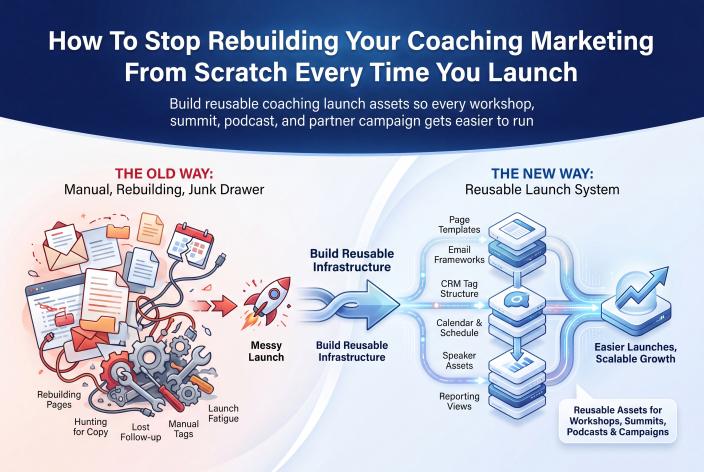
The way to stop rebuilding your coaching marketing is to keep a launch kit. It holds your page templates, a placeholder email sequence, one tag naming pattern, one booking calendar and one follow-up sequence, and every campaign uses the same set. For each new launch you copy the kit and change four things: the topic, the dates, the guests and the offer.
I'm writing this for the coach, therapist, healing practitioner or expert-led service owner who has already run a workshop, a webinar or even a summit and got clients from it, but built every launch from a blank page. You know your work helps people. The tiring part is redoing all the backstage work, and then watching clients turn up in bursts that match your launches before things go quiet again.
With a kit, your energy goes into the teaching and the offer, which are the parts only you can do. And because every launch has the same structure, you can finally compare one with the next.
Key Takeaways
- List every piece your last launch needed, mark the ones that stayed the same in substance, and put those in your kit.
- Write your launch emails once, with clear placeholders for event name, date, guest and offer, and copy that sequence for every campaign.
- Choose one tag naming pattern and one booking calendar and stick with them, so your CRM stays readable and your launches stay comparable.
- Keep a single follow-up sequence that runs after every event, and improve it after each launch instead of writing a new one.
- If you run events on EventRaptor, duplicate your last event as the starting point and let timed emails, promoter links and CRM sync handle the repeat work.
Why Every Launch Feels Like Starting From Zero
Nobody sets out to rebuild. It happens because the first launch went together in a hurry, inside whatever tools were open that week, and nothing got saved in a form you could reuse. So the next time, you open a new page builder, write new emails, invent new tags and paste a new calendar link. That's weeks of setup before you've taught anything.
I know this one from the inside. My first summit, the Solopreneur Accelerator Summit, started on August 31, 2020, with 27 speakers over four days. I built it over two weeks, working 16 to 18 hours a day with no summit system, and I don't recommend that timeline to anyone. Everything was handmade for that one event.
The damage shows up exactly where you can least afford it. At one later summit we were so busy running our clients' summits that I was too exhausted to put a proper offer together. Speakers and attendees loved the event and it added 476 new people to our list, but it made only about $1,800 while it ran. I still count it a success, because those people will keep buying from us for years. But the lesson stuck. When the build eats your time, the offer is usually the first thing to suffer.
Rebuilding hides your numbers, too. If the page, the emails and the tags are different every time, you can't tell whether a launch did better because of the topic or because you happened to write a sharper reminder email that week.
What Stays the Same From One Launch to the Next
Look closely at your last two launches and you'll see most of the work repeated. Here's how the pieces usually split.
| Piece | What stays the same | What changes each time |
|---|---|---|
| Registration page | Layout, sections, form, your bio, privacy wording | Headline, topic, dates, guest photos |
| Thank-you page | Structure, add-to-calendar step, what happens next | Event name, date, any bonus |
| Email sequence | Number of emails, timing, structure, sign-off | Event name, dates, guest names, offer details |
| Tags | The naming pattern and the stages | The short event name and date inside the tag |
| Booking calendar | One calendar, same questions, same reminders | Usually nothing |
| Follow-up sequence | The order and purpose of each email | A line or two that mentions the event |
| Offer presentation | How you explain and invite | What you offer and what it costs |
Everything in the middle column belongs in the kit. The right-hand column is your actual launch work.
Building Your Launch Kit Piece by Piece
Start with your best recent launch rather than a blank page. You've already tested those pieces with real people, so you're cleaning them up for reuse, not inventing them.
Page Templates With Obvious Swap Points
Save your strongest registration page and thank-you page as templates. Then mark every spot that changes with a bracketed placeholder such as [EVENT NAME], [DATE], [GUEST] or [OFFER]. Brackets are easy to search for later, so nothing slips through with last quarter's date on it.
Leave the trust-building parts alone between launches: your photo, a short credentials line, the form and any disclaimer wording you've already approved. Rewriting those every time adds work and risk, and they rarely make the difference.
A Placeholder Email Sequence
Write the sequence once. For a live event that usually means a welcome email on registration, a few reminders leading up to the start, a wrap-up or replay email, and the emails that present your offer.
Here's a tip. Set each email's timing relative to the event (three days before, one hour before, the morning after) instead of on fixed calendar dates. Then the timing follows whatever dates you choose next time, and all you change is the wording inside the placeholders.
One Tag Naming Pattern
Choose a pattern and use it for every launch. For example: type-shortname-yymm-stage, which gives you tags like workshop-boundaries-2603-registered, workshop-boundaries-2603-vip and workshop-boundaries-2603-booked.
The stages stay the same every time. So your CRM reports, saved filters and follow-up triggers can all be built around them once and copied, and six months from now you'll still know what each tag means.
One Booking Calendar
Send every launch to the same booking calendar, with the same questions and the same confirmation and reminder messages. Add one question about where the person heard about you, so you can see which launch brought them in without building a new calendar per campaign.
Therapists and practitioners, keep these questions about scheduling and fit. Anything clinical belongs in your normal intake process.
A Reusable Follow-Up Sequence
This piece matters most, and it's the one people skip. Once we'd made running a summit easy on EventRaptor, I noticed many of our customers still struggled. They'd add hundreds of people to their list and convert few or none, because they had no process for turning registrants into clients. In my experience, a good follow-up process might turn 10 to 15% of them into clients. That's what I've seen, not a promise, and it depends on your offer and how you follow up.
Write the follow-up once, as a sequence that invites people to a next small step and then to a conversation. If you want a model, this micro commitment funnel that warms prospects before the sales call lays out the steps and what to tag. And if your follow-up keeps stalling when your calendar fills, read how to keep client attraction running when your coaching calendar gets busy.
The Four Things You Change Each Time
Once the kit exists, a launch comes down to four decisions.
- Topic. What specific problem is this event about, and who's it for?
- Dates. When registration opens, when the event runs, and how long the offer stays open.
- Guests. Speakers, co-hosts or interviewees, if the format uses them.
- Offer. What you'll invite people into at the end, and on what terms.
That's where your thinking should go. A clearer topic and a better offer will do more for your next launch than a redesigned registration page ever could.
Making a New Launch From the Kit
When it's time for the next campaign, the setup becomes a short routine.
- Copy the kit, or duplicate your last event if your platform allows it.
- Decide the topic, dates, guests and offer before you touch any page.
- Fill in the placeholders, then search every page and email for the opening bracket to catch any you missed.
- Update the short name and date in your tags, keeping the same stages.
- Register with a test email address and send yourself every email in the sequence.
- Click the booking link in each email to make sure it opens your one calendar.
- After the launch, write down two or three changes and make them in the master kit, not only in this launch's copy.
That last step is what makes each launch a little easier than the one before. Your kit gets better every time you use it.
Why Comparable Launches Lead to Better Decisions
When the structure stays put, the numbers start to mean something. Same page, same emails, same tags, same calendar. If registrations, VIP sales, booked calls or new clients move, you can link the change to the topic, the guests or the offer, because those are the only things you changed.
Repetition builds momentum, too. The more events you run, the easier they get, because your templates and processes are already in place, and more people have seen you host. My second summit, in January 2021, had 37 speakers, and more than half of them approached me. That never would have happened before the first one.
By February 2022, Jennie and I ran Own Your Stage, our first summit on EventRaptor, with about 20 hours of admin. Compare that with 2020, when I spent two weeks working 16 to 18 hours a day to build my first summit without a system. It brought in about 600 registrations, added 466 new people to our list and made more than $24,000 in sales within two weeks of the event. That's our own result, and it doesn't predict what another host will get. But the drop in admin came from reusable structure, and you can copy that part.
Where EventRaptor and Our Team Carry the Repeat Work
If your launches are events (summits, workshops, webinars or meetings), most of the kit lives inside EventRaptor's virtual summit features, so you aren't keeping it together across five tools.
- Duplicate Event sits on the event dashboard, so a new launch starts from your last one.
- Relative event emails are scheduled from the event's start or end, in days, hours or minutes, and dynamic placeholders format the date and time for you. Change the date and the reminders follow.
- Promoter links give each partner a unique URL, and the leaderboard lets speakers see who's promoting.
- CRM sync sends registrants to GHL/CRMRaptor with tags, so your one follow-up sequence can start right away.
- Speaker records handle the summit side. Speakers apply, sign agreements and upload what's needed, and the schedule, speaker pages and attendee dashboard are built from those records. Presentations can even be copied across events.
- To-do lists with templates mean your pre-launch checklist comes with you.
To be clear about the limits: live sessions run on Zoom, and EventRaptor doesn't include in-event polls or Q&A. Video hosting for session recordings and replays is available through CRMRaptor, so you don't need a separate video host, and EventRaptor's video view analytics show you how session and replay videos are viewed. It also sits on top of GoHighLevel rather than replacing it, so your CRM and sales process stay where they are.
If you'd rather not carry any of this, our done-for-you team can run the whole summit while you choose the topic, teach, host and make the offer. You can see what happens when our team builds and runs your summit, and if you're planning your first one, the 13-week plan for your first virtual summit covers what to decide in week one.
A Note for Therapists and Healing Practitioners
The same kit works for a quarterly workshop, an intake for a group program, a free public talk or a virtual summit for therapists and healing practitioners. For example, a couples therapist might run an evening workshop on communication every season. With a kit, each season means a new topic angle, a date and perhaps a guest colleague, while the pages, reminders, calendar and follow-up stay as they are.
The kit helps with compliance as well. Check your page and email wording against your licensing board's advertising rules once, while you build the templates, and then reuse the wording you've approved. Keep therapy client testimonials and stories out of every template. And say plainly on your registration page that the event is educational and isn't therapy.
Your Pre-Launch Checklist
- Topic, dates, guests and offer are decided before any page is edited
- Registration and thank-you pages are copied from the master template
- No bracketed placeholders are left on any page or in any email
- Email timing is set relative to the event start or end
- Tags follow your pattern, with the new short name and date
- Every booking link opens your one calendar
- Test registration received every email in the sequence
- Follow-up sequence is switched on and triggered by the right tag
- Board advertising rules checked, if you're a licensed practitioner
- A note is ready to capture what you'll change in the master kit afterward
Frequently Asked Questions
How Long Does It Take to Build a Reusable Launch Kit?
If you've run at least one launch, you can usually build the kit from it in a few focused sessions, because you're cleaning up pieces you've already used. Begin with the email sequence and the tag pattern, since those save the most time later. Pages and the follow-up sequence can be tidied up during the next launch.
Won't Reusing the Same Emails Make My Launches Feel Stale?
Most people on your list see each launch in isolation, and the topic, guests and offer are new every time. The structure repeats, but the content inside it changes. If an email stops getting opened or clicked, rewrite it in the master kit so every future launch gets the better version.
What If My Offer Changes Between Launches?
That's expected, which is why the offer is one of the four things you change each time. Keep the way you present an offer (the order of the emails, when the invitation goes out, how people book) and swap in the new details. Your tags and booking calendar stay as they are.
Can I Use One Launch Kit for Summits, Webinars and Workshops?
Yes. The tag pattern, booking calendar and follow-up sequence can be shared across every format. Pages and the reminder sequence usually need one version per format, since a four-day summit needs more reminders than a single webinar. Many coaches keep one master kit with a small set of format variations.
Do I Need EventRaptor to Build a Launch Kit?
No. You can build the kit in whatever tools you use now, as long as you can save templates and copy email sequences. EventRaptor makes repeat events lighter, with duplicated events, timed emails, promoter links and CRM sync in one place, and our team can run the whole summit for you if you'd rather not do the setup at all.
Your Next Step
Open your most recent launch today and list every piece it needed. Next to each one, write either the same or changes. That list is the first draft of your kit, and it'll show you right away how much of your next launch is already done.
If you'd like help deciding which pieces belong in your kit, or whether your next launch should be a summit, a smaller workshop or simply better follow-up, Book your Client Attraction Planning Call. We'll look at what you sell, how people find you now and which repeatable event would suit your business.