To get a virtual summit found, list it in EventRaptor's public events directory with accurate topic tags and a clear image. Then invite speakers who'll share it with their own audiences, and give everyone a registration page that's easy to search for and pass along. Each of those gives people a separate way to find your event.
I'm writing this for the coach, therapist or practitioner who has put real care into a summit and now wonders who's going to see it. You've helped people, but your list might be small. And you'd rather spend your energy on the talks than on chasing traffic.
The good news is that people rarely find a summit by accident. A speaker they trust mentions it, or it turns up while they're browsing events on their topic, or a friend forwards the link. You can plan for all three.
Key Takeaways
- Switch on the directory listing for your summit, then tag it with the topics and business area your ideal attendee would actually browse.
- Upload your event logo and feature image before you publish, because those images appear on your directory listing and whenever someone shares your link.
- Search the EventRaptor speaker directory and drop into a Speaker Connections session to meet speakers who want stages and will promote to their audiences.
- Give every speaker their own promoter link and ready-made swipe copy, so sharing your summit takes them very little effort.
- Write your SEO title and descriptions in the words your attendee would type into a search box. If you're a licensed therapist, check them against your board's advertising rules.
Where Summit Registrants Come From
Before you touch any settings, it helps to see the three main ways people reach a summit and what each one needs from you.
| Where people find you | What brings them in | What you set up in EventRaptor |
|---|---|---|
| Your speakers' audiences | Someone they already trust recommends your event | Promoter links, a leaderboard speakers can see, a swipe copy link |
| The public events directory | Browsing published events by topic | The directory listing setting, topics, business areas, event logo |
| Search and social shares | A search result or a link passed along | SEO title, short and full SEO descriptions, feature image |
Speaker promotion usually brings the biggest group. More than 5,000 people on our own EventRaptor list came from other speakers promoting our summits. The directory and search work quietly in the background, and they're worth getting right because they keep working for as long as your summit is listed.
If you're still deciding whether a summit fits your business, start with what a virtual summit is and how coaches and experts use one.
Listing Your Summit in the EventRaptor Events Directory
EventRaptor has a public events directory where people can browse and filter published events. There's also a page that shows every event from a particular host, so as you run more events your past and upcoming summits sit together under your name.
You decide whether your summit appears there. Event setup has a visibility option that controls the directory listing, and your event also needs to be published. Many hosts leave it off by accident, so check it before launch.
Settings to Check Before You Publish
- The directory listing option is switched on
- Topics are chosen from the topic list, which covers hundreds of areas such as Coaching, Mindset, Nutrition and Meditation
- A business area is picked, for example Therapy, Health & Well-being or Leadership
- Your event logo is uploaded at 480x270 pixels and under 1 MB (it's required for the directory listing)
- A background cover is uploaded at 1500x200 pixels (there's a Canva template link to help)
- The host name reads the way your audience knows you
Be honest with your tags. Choose the two or three topics your ideal attendee would actually browse for. If you tag everything, nobody can tell who the summit is for.
For example, a couples therapist hosting a summit on rebuilding trust after conflict might pick Therapy and Family & Parenting as business areas, then add a small number of tightly related topics. Someone filtering for that kind of event sees a summit that clearly belongs in their search.
Finding Speakers Who Bring Their Audiences With Them
Your speakers are your biggest promotion channel, so pick them for two things: they fit your theme, and they're willing to tell their people about it. A respected name who never shares the link does less for your registrations than a mid-sized expert who emails their list twice.
Search the Speaker Directory
The EventRaptor speaker directory lists more than 3,800 speakers who want to be invited to events. You can search and filter it to find people in your niche, look at their profiles, and invite them straight to your event. They get a notification email, and from there they can apply, sign their speaker agreement and upload what you need through the platform, so you're not chasing details across a dozen email threads.
Meet Hosts and Speakers at Speaker Connections
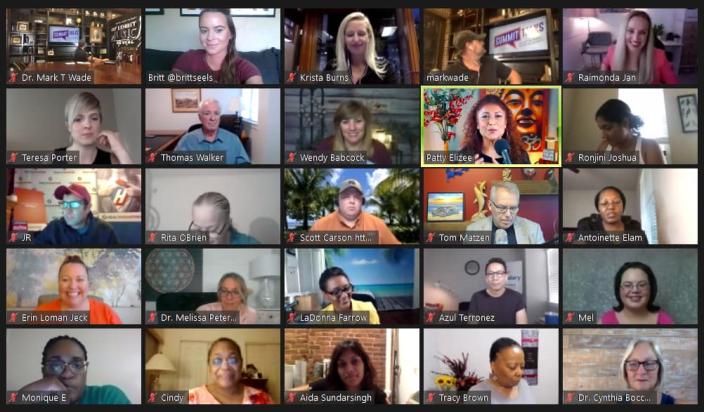
Speaker Connections is a free networking event on Zoom where speakers looking for stages meet the hosts who have them. It was Jennie's idea, and she has run it since it started in February 2022. It meets on the first and third Tuesday of each month for about two hours, and usually 70 to 110 speakers and hosts come along.
It's a relaxed place to explain your summit in a sentence or two and see who lights up. Remember that speakers want stages. When I ran my second summit in January 2021, more than half of my 37 speakers approached me. If you're worried nobody will say yes to an unknown host, read how to host your first virtual summit before anyone knows your name.
Making Your Registration Page Easy to Share and Search
A good page makes sharing easy for speakers and makes sense to a stranger who lands on it cold. Work through these in order.
- Put the promise in plain words at the top. Say who the summit is for and what they'll walk away understanding, in language your attendee would use with a friend.
- Fill in the SEO title, the short SEO description and the full SEO description in event setup. Use the phrases people actually search for, not the name of your framework. This won't guarantee a ranking, but it gives search engines and the directory something clear to show.
- Add a feature image. It's what shows up when someone shares your link on social media, and it's used on directory listings too.
- Give every speaker a unique promoter link. You'll see who each registration came from, and speakers can see the leaderboard, which gives the ones who are sharing a bit of friendly recognition.
- Add your swipe copy link in event setup, so speakers have emails and posts ready to send.
- If your plan includes it, embed the registration form on your own website so visitors can sign up without leaving your site.
You can see how these pieces connect in our overview of virtual summit software features that help coaches turn events into client attraction assets.
A Note for Therapists and Practitioners
A summit lets you teach in public, which suits people who don't like selling. Keep the page educational. Describe topics and what attendees will learn, make no promises about mental health outcomes, and say clearly that the sessions are education rather than therapy. Don't use stories or testimonials from therapy clients anywhere in your promotion.
Before you publish your SEO descriptions and swipe copy, read them against your licensing board's advertising rules. Swipe copy gets reused by your speakers word for word, so getting it right once protects you across every share.
What Our Team Takes Off Your Plate
You can run all of this yourself on EventRaptor, one of the options in our guide to choosing virtual summit software. Plenty of hosts do. But if you'd rather spend your time teaching and hosting, our done-for-you team can carry most of the promotion setup.
When we produce a summit for you, we write the swipe copy, session descriptions and speaker introductions, generate social media images and video covers for each session, and set up the Zoom meetings. Registrants sync to GHL/CRMRaptor with tags as they sign up, so your follow-up emails and booking links start working while interest is still warm. Jennie and I have run 13 summits of our own and over 40 summits for clients, and most of the work that eats a host's evenings sits in that list.
If inbox chaos is already your biggest worry, this guide on running a professional speaker event without managing everything from your inbox walks through the rest of the speaker side.
Frequently Asked Questions
How Do I List My Summit in the EventRaptor Events Directory?
In your event setup, switch on the visibility option that lists your event in the public directory, then publish the event. Add your topics, business area and a 480x270 event logo, since the logo is required for the directory listing. Once it's live, people browsing and filtering published events can find it.
How Do I Find Speakers for a Virtual Summit?
Search the EventRaptor speaker directory, which lists more than 3,800 speakers who want to be invited to events, and invite the ones who fit your theme directly from your event. You can also come to Speaker Connections, a free Zoom networking event on the first and third Tuesday of each month where speakers and hosts meet. Look for people who fit your topic and are willing to promote to their own audiences.
Does Listing My Summit in a Directory Guarantee Registrations?
No. A directory listing gives people another way to discover your summit, but it can't promise any number of registrations. Most hosts get their biggest registration numbers from speakers sharing promoter links with their audiences, so treat the directory as one channel among several.
Is Speaker Connections Free to Attend?
Yes. Speaker Connections is a free networking event on Zoom that runs for about two hours on the first and third Tuesday of each month. Usually 70 to 110 speakers and hosts attend, which makes it a practical place for a summit host to find speakers.
What Should I Put in My Summit's SEO Description?
Describe who the summit is for and what they'll learn, using the words your ideal attendee would type into a search box. Keep it specific to your topic and skip the hype. Therapists should also check the wording against their licensing board's advertising rules before publishing.
Your Next Step
Open your event setup today and work down the checklist above: switch on the listing, choose your tags, upload the logo and feature image, and write your SEO description. Then search the speaker directory for five people who fit your theme and send them invitations.
If you'd like help planning the speaker lineup and promotion for your summit before you open registration, Book your Client Attraction Planning Call. We'll go through who you serve, how people find you now, and whether a full summit or a smaller event makes more sense for you first.