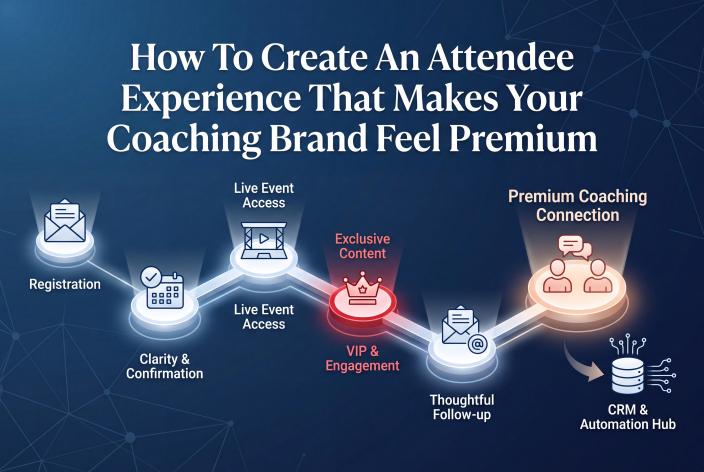
A coaching event feels premium when attendees never have to wonder what happens next. You get there with a specific registration page, reminders that arrive when people need them, one obvious place to find every session, a VIP offer that gives real access, and follow-up that carries on the conversation after the last session. Good design helps. What people remember most is how easy you made it for them.
I'm writing this for the coach, therapist or healing practitioner who's good at the work, has helped plenty of people, and wants their summit, workshop or webinar to feel like it came from someone established. You don't need a studio or a bigger budget. You need the small moments between "Register" and "Book a call" handled with care.
Those moments are also the easiest ones to rush when you're building everything yourself late the night before. Jennie and I have run 13 summits of our own and over 40 summits for clients. When something's missing, the attendee experience is where people notice it first.
Key Takeaways
- Write your registration page so a stranger can see the dates, time zone, format and what they'll learn before they scroll.
- Use the thank-you page and welcome email to confirm the details, offer a calendar link and point people to the one place where everything lives.
- Time each reminder email to answer a question attendees would otherwise send to your inbox.
- Give your VIP pass something people can feel, such as a seat on the live calls, and show VIPs their own dashboard message.
- Tag registrants in your CRM by what they told you and what they bought, so your follow-up invites the right people to talk while the event is fresh.
What Attendees Actually Judge You On
Attendees rarely comment on your fonts. They notice whether they felt looked after. Here are the six moments where that happens, what's running through the attendee's head at each one, and what makes it feel premium.
| Moment | What the attendee wants to know | What makes it feel premium |
|---|---|---|
| Registration page | Is this for me, and when is it? | A specific promise, dates with a time zone, speaker photos, a short form |
| Thank-you page | Did that work, and what now? | Clear confirmation, a calendar link, a link to the attendee dashboard |
| Reminder emails | When do I show up, and where? | Emails that arrive on schedule with one clear link |
| Event day | Where do I click? | One dashboard, doors open a few minutes early, a visible agenda |
| VIP experience | Was this worth paying for? | Real access, a separate dashboard message, purchases easy to find |
| After the event | What's next for me? | Follow-up that matches their interest and an invitation to a conversation |
None of those needs a designer. Each one needs a decision made ahead of time, and someone (or something) making sure it happens on schedule.
Registration Pages That Tell People Exactly What They're Getting
Your registration page makes the first impression. A premium page is specific. It names who the event is for, the problem it helps with, and what someone will walk away understanding. Put the dates and times near the top with the time zone written out, then say whether sessions are live on Zoom, prerecorded, or both, and how long replays stay open.
Speaker photos with names and session titles do a lot of quiet work here. They show the event is real and that respected people chose to be part of it.
Keep the form short. A name and email is enough for most events, but one well-chosen custom question can make your follow-up far more personal. For example, a health coach might ask, "What's the one thing you most want help with right now?" and use the answers to decide which follow-up email each person gets.
A note for therapists and practitioners. Describe your event as education, because that's what it is. Leave out outcome promises such as "overcome anxiety in three days", never use stories or testimonials from therapy clients, and check your licensing board's advertising rules before the page goes live.
The Thank-You Page And Welcome Email Set The Tone
The minute after someone registers is when they're paying the most attention to you. Use it.
Your thank-you page should confirm the registration in plain words, offer an "add to calendar" link, and show people exactly where they'll find the sessions. Tell them to check their promotions or spam folder if your welcome email doesn't arrive, because emails do land there, and an attendee who can't find anything blames the host.
The thank-you page is also a natural place for a VIP offer. Destini Copp, a paid ads specialist, described on a podcast episode how she put her all-access pass on the summit thank-you page at $47 for a limited time. Sales of those passes paid for all of her Facebook and Instagram ads. If you put a time limit on your offer, make it real and stick to it. A deadline that quietly resets makes your brand feel cheaper.
The welcome email should repeat the essentials: dates, the dashboard link, what to expect, and who to contact if something goes wrong.
Reminder Emails People Are Glad To Get
Good reminders feel like a concierge. Each one answers a question before the attendee has to ask it. Here's a simple sequence for a multi-day summit:
- Welcome email, sent the moment someone registers, with the dashboard link and dates.
- A few days before, the agenda and a nudge to pick the sessions they want to see.
- The day before, what happens tomorrow, the start time and the link.
- Shortly before each live session, a short note with the join link and nothing else competing for attention.
- Each morning of the event, today's sessions and how long the replays stay up.
- After the final session, the replay window, the VIP pass for anyone who wants to keep access, and what comes next.
Adjust the count to your event. A one-hour workshop needs far fewer emails than a four-day summit.
In EventRaptor, you schedule these relative to the event's start or end, so if the date moves, the emails move with it. Placeholders drop the session date and time into each email, you can send yourself a test before anything goes out, and the send status shows what's gone and what's waiting. You set it up once and stop wondering whether the 8am reminder actually went.
One Place To Find Everything On Event Day
Nothing feels less premium than an attendee digging through five emails to find a Zoom link. Give people one home base and point every email at it.
An EventRaptor attendee dashboard can show different messages before the event opens, while it's running, and after it closes, so the page always matches the moment. You choose how many minutes before the start the doors open (the default is 5), which gives early arrivals somewhere to land instead of an error.
What belongs on that dashboard:
- The agenda, by day, with speaker names and session titles
- A short "about your host" section, so attendees get to know you between sessions
- Support details, including how to reach you and when to expect a reply (it's fine to say you're a small team)
- Short answers to the questions you'll otherwise get by email: how long replays stay open, how to find what they bought, how VIPs get their live-call link, and your refund policy
One honest limit. EventRaptor doesn't include in-event polls, Q&A or networking. Live sessions run on Zoom, so plan the interaction inside the Zoom session itself. For session recordings and replays, video hosting is available through CRMRaptor, our GoHighLevel solution, so you don't need a separate video host, and EventRaptor's video view analytics show you how those videos are being viewed.
A VIP Offer That Gives Real Access
Plenty of summits sell an "all access pass" that doesn't give access to much beyond replays. A VIP offer feels premium when the buyer gets something they can feel.
One approach that works well is giving VIPs a front-row seat on the live Zoom calls with the host and speakers. It changes your whole email sequence, too. Every reminder can mention, naturally, that VIPs should watch for their special Zoom link, and anyone who wants that seat can click to find out more. That's selling gently all week, with no hard pitch at the end.
Then make VIPs feel recognized once they've bought. EventRaptor lets you show VIP attendees their own dashboard message, so they see their bonuses and links straight away while free registrants see the standard view.
The offer matters more than many hosts expect. At my first summit, the Solopreneur Accelerator Summit, which started on August 31, 2020, I sold $3,500 in VIP tickets. At Own Your Stage in February 2022, the first summit Jennie and I ran on EventRaptor, we sold 109 VIP tickets at $47. I've also had the opposite. At one summit I was too exhausted to put a proper offer together, and although speakers and attendees loved it, it made only about $1,800 during the event. Those are my results, and they don't predict what another host will see.
For therapists and practitioners, keep VIP extras educational: extended replay access, a workbook, or a live group session framed clearly as education, not individual advice or treatment.
Follow-Up That Feels Like A Continuation
The attendee experience doesn't end when the last session does. If the next email someone gets is a generic newsletter three weeks later, everything you built starts to fade.
When registrants sync from EventRaptor into GoHighLevel (we call our version CRMRaptor), each contact arrives with tags. You can tag by VIP status, by the promoter who sent them, and by their answer to your registration question. That lets a VIP who said "I keep losing clients after the first session" get a different follow-up from a free registrant who said "I'm just exploring."
A useful next step for warm attendees is a smaller, focused event. If that appeals, here's how to set up a free coaching workshop that qualifies prospects before anyone books a call. Once someone does book, the pages and emails they see before the call matter just as much, and the pre-call trust path covers what to send.
In my experience, a good follow-up process might turn 10 to 15% of registrants and attendees into clients. That's my observation, not a promise. But I've watched hosts add hundreds of people to their list and convert almost none of them because nothing happened after the event. "Build it and they will come" is a myth.
What EventRaptor And Our Team Take Off Your Plate
Here's what the work looks like done by hand compared with running it on EventRaptor.
| Task | Doing it by hand | On EventRaptor |
|---|---|---|
| Registration and thank-you pages | Separate page builder, links copied by hand | Built in, with drafts kept apart from live pages |
| Reminders | Calendar notes and manual sends | Scheduled around the event's timing, with send status |
| Event access | Zoom links pasted into every email | One attendee dashboard with doors-open timing |
| VIP experience | A separate list and separate emails | VIP status on each registrant and its own dashboard message |
| Speaker pages and schedule | Rebuilt for every speaker | Generated from the speaker and session records |
| CRM | Export a spreadsheet, import, tag | Registrants sync to GoHighLevel with tags |
If you'd rather not touch any of it, our done-for-you team runs the whole summit. We write the swipe copy, session descriptions and speaker introductions, set up the Zoom meetings and create the cover images, so your job is to teach, host and make your offer. On the most recent summit we produced, multiple attendees and speakers told us it was "the best run summit they had ever seen".
One host I think about often is Lucy Bedewi of My Write Hand Woman. We produced her Out-Earn Your Man summit in September 2021. Her email list grew from 25 people to 825, she booked 4 discovery calls right after she presented, and all 4 became clients. Her talk brought in $10K in sales. This is one person's result. It doesn't predict results for another host.
You don't need to be technical to use the platform yourself, either. We designed it around a 70-year-old group coaching client who'd only been using computers for two or three years, and in December 2021 she ran a twelve-speaker summit on EventRaptor without help from anyone. You can see how the summit features are organized by job, and if you want the event without managing every piece, the calm launch plan for a premium coaching event shows how the work gets divided up.
A Premium Attendee Experience Checklist
- Registration page names who it's for, the problem, dates, time zone, format and replay window
- Speaker photos and session titles are visible
- Form has a name, an email and at most one or two custom questions
- Thank-you page confirms registration, offers a calendar link and shows the dashboard link
- Welcome email repeats the essentials and tells people to check their promotions folder
- Reminder sequence is scheduled and tested
- Dashboard shows the right message before, during and after the event
- Dashboard includes the agenda, host bio, support contact and short FAQs
- VIP pass includes real access, and VIPs see their own dashboard message
- Any deadline on the offer is real and will be honored
- Registrants sync to your CRM with tags for VIP status and interest
- Post-event follow-up and the next invitation are written before the event starts
- Therapists and practitioners: copy checked against your board's advertising rules
Frequently Asked Questions
Do I Need Professional Design To Make My Event Feel Premium?
No. Attendees judge your event mostly by how clear and reliable it is: a specific registration page, reminders that arrive on time, and one place to find everything. A clean logo and a decent cover image help, but a beautifully designed event where people can't find the Zoom link still feels amateur.
What Should A VIP Pass Include For A Coaching Summit?
Give it something people can feel, beyond replays alone. A seat on the live Zoom calls with you and your speakers works well because it's easy to explain and easy to mention in every reminder. Add extended replay access or a workbook if they fit, and make sure buyers can find what they paid for straight away.
How Many Reminder Emails Should I Send Before And During A Summit?
Send as many as your attendees need to show up, and no more. For a multi-day summit, that usually means a welcome email, an agenda email a few days out, a day-before note, a short email before each live session and a daily schedule email. A single short workshop needs only a few.
Can Therapists Run A Summit Without It Feeling Like Advertising Or Therapy?
Yes, when it's framed as public education. Teach useful ideas, make no clinical claims or outcome promises, never use stories or testimonials from therapy clients, and say clearly that the sessions aren't therapy. Check your licensing board's advertising rules before you publish your pages and emails.
What Doesn't EventRaptor Do For The Attendee Experience?
EventRaptor doesn't include in-event networking, polls or Q&A. Live sessions run on Zoom, so audience interaction happens inside the Zoom session. EventRaptor handles the pages, reminders, dashboard, VIP status, video view analytics and CRM sync around it, and video hosting for session recordings and replays is available through CRMRaptor, our GoHighLevel solution.
Your Next Step
Pick one event you're planning and walk through it as an attendee. Register with a spare email address, read every email you receive and try to find the session link from your phone. Anywhere you hesitate, your attendees will hesitate too, and that's the first thing to fix.
If you'd like us to walk through it with you, Book your Client Attraction Planning Call. We'll look at what you offer and who you serve, then work out whether a summit, a smaller event or better follow-up should come first, and how much of the build you'd like us to take on.